7 типов современных баз данных: предназначение, достоинства и недостатки
Какую базу данных выбрать для проекта, чтобы работа была эффективной? Разбор достоинств и недостатков, а также примеры разных типов БД.
Артём Гогин
руководитель направления в хранилище данных в Сбербанке
Существуют сотни баз данных SQL и NoSQL. Одни популярны, другие игнорируются. Некоторые просты и хорошо документированы, а некоторые сложны в использовании. Одни имеют открытый код, а другие проприетарные. Что, возможно, наиболее важно, некоторые масштабируемы, оптимизированы, высокодоступны, а некоторые сложно масштабировать или поддерживать.
Возникает естественный вопрос: какую базу данных выбрать? Чтобы ответить на него, мы должны решить, чего мы хотим достичь с помощью базы данных. Чтобы составить представление, необходимо ответить на следующие вопросы:
- Нужен ли нам аналитический доступ к базе данных?
- Нужно ли нам писать или читать в реальном времени?
- Сколько таблиц / записей мы хотим сохранить?
- Какая доступность нам нужна?
- Нужны ли нам столбцы?
- Сможем ли мы получить доступ к таблицам, отфильтрованным по столбцам или по строкам?
Принимая решение, нужно помнить, что может предложить та или иная база данных. Специфика каждой БД может отличаться, но в целом существует только несколько типов, в рамках которых мы можем достичь в основном одинаковых целей. Рассмотрим их подробнее.
Реляционные базы данных SQL
Если вы когда-либо работали с базами данных, скорее всего, вы начали с этого типа, потому что он самый популярный и распространенный. Такие БД позволяют хранить данные в реляционных таблицах с определенными столбцами определенного типа. Реляционные таблицы хороши для нормализации и объединения.
- Поддержка SQL
- ACID-транзакции (атомарность, согласованность, изоляция и долговечность)
- Поддержка индексации и разделения
- Плохая поддержка неструктурированных данных / сложных типов
- Плохая оптимизация обработки событий
- Сложное / дорогое масштабирование
Примеры: Oracle DB, MySQL, PostgreSQL.
Документно-ориентированные базы данных
Если мы не хотим объединять несколько таблиц для получения нужных данных, мы можем взглянуть на документно-ориентированные базы данных. Они позволяют хранить записи в формате JSON. В этом формате мы можем создать сложное значение для любого ключа и сразу включить всю структуру данных в одну запись.
- Нет привязки к схеме
- Нет необходимости всегда писать все поля в каждой записи
- Хорошая поддержка сложных типов
- Подходит для OLTP
- Плохая поддержка транзакций
- Слабая аналитическая поддержка
- Сложное / дорогое масштабирование
Базы данных в оперативной памяти
Базы данных этого типа могут предоставлять в реальном времени ответ для выбора и вставки определенных записей. Большинство из них в основном хранят данные в ОЗУ, но в некоторых случаях они также предлагают постоянное хранилище на жестких дисках или твердотельных накопителях. Большинство этих баз данных работают с записями «ключ-значение», поэтому значения можно запоминать в формате, ориентированном на документы. Но некоторые базы данных также работают со столбцами и позволяют вторичное индексирование той же таблицы. Использование ОЗУ позволяет обрабатывать данные быстро, но делает их более нестабильными и дорогостоящими.
- Быстрое написание
- Быстрое чтение
- Труднодостижимая надёжность
- Дорогое масштабирование
Примеры: Redis, Tarantool, Apache Ignite.
Базы данных с широкими столбцами
Эти базы данных хранят данные в виде записей ключ / значение на жестком диске или твердотельном накопителе. Эти решения предназначены для достаточно хорошего масштабирования, чтобы управлять петабайтами данных на тысячах общих серверов в распределенной системе. Они представляют архитектуру SSTable. Эта архитектура была разработана для двух случаев использования: быстрый доступ к ключу и быстрая запись с высокой доступностью.
- Быстрая запись построчно
- Быстрое чтение по ключу
- Хорошая масштабируемость
- Высокая доступность
- Формат «ключ-значение»
- Нет поддержки аналитики
Примеры: Cassandra, HBase.
Столбчатые базы данных
Иногда нам нужно быстро получить доступ к данным не с помощью определенных ключей, а с помощью определенных столбцов. В этом случае лучше отказаться от построчной вставки и перейти к пакетной записи. Пакетная вставка позволяет столбчатым базам данных готовить данные для быстрого чтения по столбцам.
- Быстрое чтение столбец за столбцом
- Хорошая аналитическая поддержка
- Хорошая масштабируемость
- Подходит только для пакетных вставок
Примеры: Vertica, Clickhouse.
Поисковая система
Если мы хотим получить доступ к данным с помощью фильтра по любому значению и даже по любому слову в столбце, мы должны вспомнить про поисковые системы. Эти базы данных выполняют индексацию каждого слова в столбцах и позволяют выполнять полнотекстовый поиск. Они идеально подходят для хранения и анализа журналов или больших текстовых значений.
- Быстрый доступ по любому слову
- Хорошая масштабируемость
- Подходит только для пакетных вставок
- Плохая аналитическая поддержка
Графовые базы данных
Для некоторых случаев подходят графовые структуры данных. Если ваши задачи требуют работы с графами, существуют специальные базы данных, которые удовлетворят ваши потребности.
- Структура данных графа
- Управляемые отношения между сущностями
- Гибкие конструкции
- Специальный язык запросов
- Трудно масштабировать
Выводы
Практически любую задачу можно выполнить практически с любым типом базы данных. Вопрос в том, насколько это будет дорого и оптимизировано. Выбор инструмента, к которому вы привыкли, может сократить ваше время вывода на рынок. Но он также может стоить вам огромных денег на обслуживание и расширение вашего оборудования, которое может быть использовано неэффективно. Всегда старайтесь использовать базу данных так, как она задумана. Возможно, решение, соответствующее вашим потребностям, уже существует.
На данный момент этот блок не поддерживается, но мы не забыли о нём! Наша команда уже занята его разработкой, он будет доступен в ближайшее время.
Если вы готовитесь к собеседованию, посмотрите также статью, в которой собраны 27 распространённых вопросов по SQL и ответы на них.
JSON — Overview
JSON or JavaScript Object Notation is a lightweight text-based open standard designed for human-readable data interchange. Conventions used by JSON are known to programmers, which include C, C++, Java, Python, Perl, etc.
- JSON stands for JavaScript Object Notation.
- The format was specified by Douglas Crockford.
- It was designed for human-readable data interchange.
- It has been extended from the JavaScript scripting language.
- The filename extension is .json.
- JSON Internet Media type is application/json.
- The Uniform Type Identifier is public.json.
Uses of JSON
- It is used while writing JavaScript based applications that includes browser extensions and websites.
- JSON format is used for serializing and transmitting structured data over network connection.
- It is primarily used to transmit data between a server and web applications.
- Web services and APIs use JSON format to provide public data.
- It can be used with modern programming languages.
Characteristics of JSON
- JSON is easy to read and write.
- It is a lightweight text-based interchange format.
- JSON is language independent.
Simple Example in JSON
The following example shows how to use JSON to store information related to books based on their topic and edition.
After understanding the above program, we will try another example. Let’s save the below code as json.htm −
JSON example
Now let’s try to open json.htm using IE or any other javascript enabled browser that produces the following result −
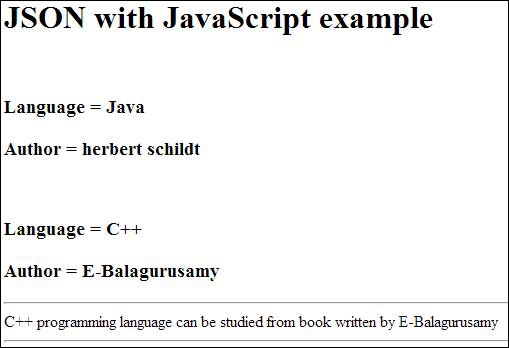
You can refer to JSON Objects chapter for more information on JSON objects.
JSON — Syntax
Let’s have a quick look at the basic syntax of JSON. JSON syntax is basically considered as a subset of JavaScript syntax; it includes the following −
- Data is represented in name/value pairs.
- Curly braces hold objects and each name is followed by ‘:'(colon), the name/value pairs are separated by , (comma).
- Square brackets hold arrays and values are separated by ,(comma).
Below is a simple example −
JSON supports the following two data structures −
- Collection of name/value pairs − This Data Structure is supported by different programming languages.
- Ordered list of values − It includes array, list, vector or sequence etc.
JSON — DataTypes
JSON format supports the following data types −
double- precision floating-point format in JavaScript
double-quoted Unicode with backslash escaping
an ordered sequence of values
it can be a string, a number, true or false, null etc
an unordered collection of key:value pairs
can be used between any pair of tokens
Number
- It is a double precision floating-point format in JavaScript and it depends on implementation.
- Octal and hexadecimal formats are not used.
- No NaN or Infinity is used in Number.
The following table shows the number types −
Digits 1-9, 0 and positive or negative
Fractions like .3, .9
Exponent like e, e+, e-, E, E+, E-
Syntax
var json-object-name =
Example
Example showing Number Datatype, value should not be quoted −
var obj =
String
- It is a sequence of zero or more double quoted Unicode characters with backslash escaping.
- Character is a single character string i.e. a string with length 1.
The table shows various special characters that you can use in strings of a JSON document −
four hexadecimal digits
Syntax
var json-object-name =
Example
Example showing String Datatype −
var obj =
Boolean
It includes true or false values.
Syntax
var json-object-name = < string : true/false, . >
Example
var obj =
Array
- It is an ordered collection of values.
- These are enclosed in square brackets which means that array begins with .[. and ends with .]..
- The values are separated by , (comma).
- Array indexing can be started at 0 or 1.
- Arrays should be used when the key names are sequential integers.
Syntax
[ value, . ]
Example
Example showing array containing multiple objects −
Object
- It is an unordered set of name/value pairs.
- Objects are enclosed in curly braces that is, it starts with ».
- Each name is followed by ‘:'(colon) and the key/value pairs are separated by , (comma).
- The keys must be strings and should be different from each other.
- Objects should be used when the key names are arbitrary strings.
Syntax
Example
Example showing Object −
Whitespace
It can be inserted between any pair of tokens. It can be added to make a code more readable. Example shows declaration with and without whitespace −
Syntax
Example
var obj1 = var obj2 =
null
It means empty type.
Syntax
null
Example
var i = null; if(i == 1) < document.write("value is 1
"); > else < document.write("value is null
"); >
JSON Value
- number (integer or floating point)
- string
- boolean
- array
- object
- null
Syntax
String | Number | Object | Array | TRUE | FALSE | NULL
Example
var i = 1; var j = "sachin"; var k = null;
JSON — Objects
Creating Simple Objects
JSON objects can be created with JavaScript. Let us see the various ways of creating JSON objects using JavaScript −
- Creation of an empty Object −
var JSONObj = <>;
- Creation of a new Object −
var JSONObj = new Object();
- Creation of an object with attribute bookname with value in string, attribute price with numeric value. Attribute is accessed by using ‘.’ Operator −
var JSONObj = < "bookname ":"VB BLACK BOOK", "price":500 >;
This is an example that shows creation of an object in javascript using JSON, save the below code as json_object.htm −
Creating Object JSON with JavaScript
Now let’s try to open Json Object using IE or any other javaScript enabled browser. It produces the following result −
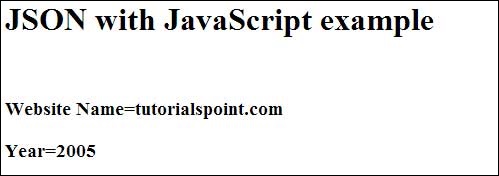
Creating Array Objects
The following example shows creation of an array object in javascript using JSON, save the below code as json_array_object.htm −
Creation of array object in javascript using JSON
Now let’s try to open Json Array Object using IE or any other javaScript enabled browser. It produces the following result −
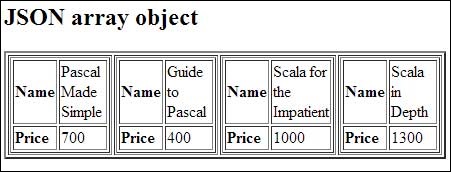
JSON — Schema
JSON Schema is a specification for JSON based format for defining the structure of JSON data. It was written under IETF draft which expired in 2011. JSON Schema −
- Describes your existing data format.
- Clear, human- and machine-readable documentation.
- Complete structural validation, useful for automated testing.
- Complete structural validation, validating client-submitted data.
JSON Schema Validation Libraries
There are several validators currently available for different programming languages. Currently the most complete and compliant JSON Schema validator available is JSV.
| Languages | Libraries |
|---|---|
| C | WJElement (LGPLv3) |
| Java | json-schema-validator (LGPLv3) |
| .NET | Json.NET (MIT) |
| ActionScript 3 | Frigga (MIT) |
| Haskell | aeson-schema (MIT) |
| Python | Jsonschema |
| Ruby | autoparse (ASL 2.0); ruby-jsonschema (MIT) |
| PHP | php-json-schema (MIT). json-schema (Berkeley) |
| JavaScript | Orderly (BSD); JSV; json-schema; Matic (MIT); Dojo; Persevere (modified BSD or AFL 2.0); schema.js. |
JSON Schema Example
Given below is a basic JSON schema, which covers a classical product catalog description −
< "$schema": "http://json-schema.org/draft-04/schema#", "title": "Product", "description": "A product from Acme's catalog", "type": "object", "properties": < "id": < "description": "The unique identifier for a product", "type": "integer" >, "name": < "description": "Name of the product", "type": "string" >, "price": < "type": "number", "minimum": 0, "exclusiveMinimum": true >>, "required": ["id", "name", "price"] >
Let’s the check various important keywords that can be used in this schema −
The $schema keyword states that this schema is written according to the draft v4 specification.
You will use this to give a title to your schema.
description
A little description of the schema.
The type keyword defines the first constraint on our JSON data: it has to be a JSON Object.
Defines various keys and their value types, minimum and maximum values to be used in JSON file.
This keeps a list of required properties.
This is the constraint to be put on the value and represents minimum acceptable value.
exclusiveMinimum
If «exclusiveMinimum» is present and has boolean value true, the instance is valid if it is strictly greater than the value of «minimum».
This is the constraint to be put on the value and represents maximum acceptable value.
exclusiveMaximum
If «exclusiveMaximum» is present and has boolean value true, the instance is valid if it is strictly lower than the value of «maximum».
A numeric instance is valid against «multipleOf» if the result of the division of the instance by this keyword’s value is an integer.
The length of a string instance is defined as the maximum number of its characters.
The length of a string instance is defined as the minimum number of its characters.
A string instance is considered valid if the regular expression matches the instance successfully.
You can check a http://json-schema.org for the complete list of keywords that can be used in defining a JSON schema. The above schema can be used to test the validity of the following JSON code −
JSON — Comparison with XML
JSON and XML are human readable formats and are language independent. They both have support for creation, reading and decoding in real world situations. We can compare JSON with XML, based on the following factors −
Verbose
XML is more verbose than JSON, so it is faster to write JSON for programmers.
Arrays Usage
XML is used to describe the structured data, which doesn’t include arrays whereas JSON include arrays.
Parsing
JavaScript’s eval method parses JSON. When applied to JSON, eval returns the described object.
Example
Individual examples of XML and JSON −
JSON
XML
Volkswagen Vento 800000
JSON with PHP
This chapter covers how to encode and decode JSON objects using PHP programming language. Let’s start with preparing the environment to start our programming with PHP for JSON.
Environment
As of PHP 5.2.0, the JSON extension is bundled and compiled into PHP by default.
JSON Functions
| Function | Libraries |
|---|---|
| json_encode | Returns the JSON representation of a value. |
| json_decode | Decodes a JSON string. |
| json_last_error | Returns the last error occurred. |
Encoding JSON in PHP (json_encode)
PHP json_encode() function is used for encoding JSON in PHP. This function returns the JSON representation of a value on success or FALSE on failure.
Syntax
string json_encode ( $value [, $options = 0 ] )
Parameters
- value − The value being encoded. This function only works with UTF-8 encoded data.
- options − This optional value is a bitmask consisting of JSON_HEX_QUOT, JSON_HEX_TAG, JSON_HEX_AMP, JSON_HEX_APOS, JSON_NUMERIC_CHECK, JSON_PRETTY_PRINT, JSON_UNESCAPED_SLASHES, JSON_FORCE_OBJECT.
Example
The following example shows how to convert an array into JSON with PHP −
1, 'b' => 2, 'c' => 3, 'd' => 4, 'e' => 5); echo json_encode($arr); ?>
While executing, this will produce the following result −
The following example shows how the PHP objects can be converted into JSON −
$e = new Emp(); $e->name = "sachin"; $e->hobbies = "sports"; $e->birthdate = date('m/d/Y h:i:s a', "8/5/1974 12:20:03 p"); $e->birthdate = date('m/d/Y h:i:s a', strtotime("8/5/1974 12:20:03")); echo json_encode($e); ?>
While executing, this will produce the following result −
Decoding JSON in PHP (json_decode)
PHP json_decode() function is used for decoding JSON in PHP. This function returns the value decoded from json to appropriate PHP type.
Syntax
mixed json_decode ($json [,$assoc = false [, $depth = 512 [, $options = 0 ]]])
Paramaters
- json_string − It is an encoded string which must be UTF-8 encoded data.
- assoc − It is a boolean type parameter, when set to TRUE, returned objects will be converted into associative arrays.
- depth − It is an integer type parameter which specifies recursion depth
- options − It is an integer type bitmask of JSON decode, JSON_BIGINT_AS_STRING is supported.
Example
The following example shows how PHP can be used to decode JSON objects −
'; var_dump(json_decode($json)); var_dump(json_decode($json, true)); ?>
While executing, it will produce the following result −
object(stdClass)#1 (5) < ["a"] =>int(1) ["b"] => int(2) ["c"] => int(3) ["d"] => int(4) ["e"] => int(5) > array(5) < ["a"] =>int(1) ["b"] => int(2) ["c"] => int(3) ["d"] => int(4) ["e"] => int(5) >
JSON with Perl
This chapter covers how to encode and decode JSON objects using Perl programming language. Let’s start with preparing the environment to start our programming with Perl for JSON.
Environment
Before you start encoding and decoding JSON using Perl, you need to install JSON module, which can be obtained from CPAN. Once you downloaded JSON-2.53.tar.gz or any other latest version, follow the steps mentioned below −
$tar xvfz JSON-2.53.tar.gz $cd JSON-2.53 $perl Makefile.PL $make $make install
JSON Functions
| Function | Libraries |
|---|---|
| encode_json | Converts the given Perl data structure to a UTF-8 encoded, binary string. |
| decode_json | Decodes a JSON string. |
| to_json | Converts the given Perl data structure to a json string. |
| from_json | Expects a json string and tries to parse it, returning the resulting reference. |
| convert_blessed | Use this function with true value so that Perl can use TO_JSON method on the object’s class to convert an object into JSON. |
Encoding JSON in Perl (encode_json)
Perl encode_json() function converts the given Perl data structure to a UTF-8 encoded, binary string.
Syntax
$json_text = encode_json ($perl_scalar ); or $json_text = JSON->new->utf8->encode($perl_scalar);
Example
The following example shows arrays under JSON with Perl −
#!/usr/bin/perl use JSON; my %rec_hash = ('a' => 1, 'b' => 2, 'c' => 3, 'd' => 4, 'e' => 5); my $json = encode_json \%rec_hash; print "$json\n";
While executing, this will produce the following result −
The following example shows how Perl objects can be converted into JSON −
#!/usr/bin/perl package Emp; sub new < my $class = shift; my $self = < name =>shift, hobbies => shift, birthdate => shift, >; bless $self, $class; return $self; > sub TO_JSON < return < %< shift() >>; > package main; use JSON; my $JSON = JSON->new->utf8; $JSON->convert_blessed(1); $e = new Emp( "sachin", "sports", "8/5/1974 12:20:03 pm"); $json = $JSON->encode($e); print "$json\n";
On executing, it will produce the following result −
Decoding JSON in Perl (decode_json)
Perl decode_json() function is used for decoding JSON in Perl. This function returns the value decoded from json to an appropriate Perl type.
Syntax
$perl_scalar = decode_json $json_text or $perl_scalar = JSON->new->utf8->decode($json_text)
Example
The following example shows how Perl can be used to decode JSON objects. Here you will need to install Data::Dumper module if you already do not have it on your machine.
#!/usr/bin/perl use JSON; use Data::Dumper; $json = ''; $text = decode_json($json); print Dumper($text);
On executing, it will produce following result −
$VAR1 = < 'e' =>5, 'c' => 3, 'a' => 1, 'b' => 2, 'd' => 4 >;
JSON with Python
This chapter covers how to encode and decode JSON objects using Python programming language. Let’s start with preparing the environment to start our programming with Python for JSON.
Environment
Before you start with encoding and decoding JSON using Python, you need to install any of the JSON modules available. For this tutorial we have downloaded and installed Demjson as follows −
$tar xvfz demjson-1.6.tar.gz $cd demjson-1.6 $python setup.py install
JSON Functions
| Function | Libraries |
|---|---|
| encode | Encodes the Python object into a JSON string representation. |
| decode | Decodes a JSON-encoded string into a Python object. |
Encoding JSON in Python (encode)
Python encode() function encodes the Python object into a JSON string representation.
Syntax
demjson.encode(self, obj, nest_level=0)
Example
The following example shows arrays under JSON with Python.
#!/usr/bin/python import demjson data = [ < 'a' : 1, 'b' : 2, 'c' : 3, 'd' : 4, 'e' : 5 >] json = demjson.encode(data) print json
While executing, this will produce the following result −
Decoding JSON in Python (decode)
Python can use demjson.decode() function for decoding JSON. This function returns the value decoded from json to an appropriate Python type.
Syntax
demjson.decode(self, txt)
Example
The following example shows how Python can be used to decode JSON objects.
#!/usr/bin/python import demjson json = ''; text = demjson.decode(json) print text
On executing, it will produce the following result −
JSON with Ruby
This chapter covers how to encode and decode JSON objects using Ruby programming language. Let’s start with preparing the environment to start our programming with Ruby for JSON.
Environment
Before you start with encoding and decoding JSON using Ruby, you need to install any of the JSON modules available for Ruby. You may need to install Ruby gem, but if you are running latest version of Ruby then you must have gem already installed on your machine, otherwise let’s follow the following single step assuming you already have gem installed −
$gem install json
Parsing JSON using Ruby
The following example shows that the first 2 keys hold string values and the last 3 keys hold arrays of strings. Let’s keep the following content in a file called input.json.
Given below is a Ruby program that will be used to parse the above mentioned JSON document −
#!/usr/bin/ruby require 'rubygems' require 'json' require 'pp' json = File.read('input.json') obj = JSON.parse(json) pp obj
On executing, it will produce the following result −
< "President"=>"Alan Isaac", "CEO"=>"David Richardson", "India"=> ["Sachin Tendulkar", "Virender Sehwag", "Gautam Gambhir"], "Srilanka"=> ["Lasith Malinga ", "Angelo Mathews", "Kumar Sangakkara"], "England"=> ["Alastair Cook", "Jonathan Trott", "Kevin Pietersen"] >
JSON with Java
This chapter covers how to encode and decode JSON objects using Java programming language. Let’s start with preparing the environment to start our programming with Java for JSON.
Environment
Before you start with encoding and decoding JSON using Java, you need to install any of the JSON modules available. For this tutorial we have downloaded and installed JSON.simple and have added the location of json-simple-1.1.1.jar file to the environment variable CLASSPATH.
Mapping between JSON and Java entities
JSON.simple maps entities from the left side to the right side while decoding or parsing, and maps entities from the right to the left while encoding.
| JSON | Java |
|---|---|
| string | java.lang.String |
| number | java.lang.Number |
| true|false | java.lang.Boolean |
| null | null |
| array | java.util.List |
| object | java.util.Map |
On decoding, the default concrete class of java.util.List is org.json.simple.JSONArray and the default concrete class of java.util.Map is org.json.simple.JSONObject.
Encoding JSON in Java
Following is a simple example to encode a JSON object using Java JSONObject which is a subclass of java.util.HashMap. No ordering is provided. If you need the strict ordering of elements, use JSONValue.toJSONString ( map ) method with ordered map implementation such as java.util.LinkedHashMap.
import org.json.simple.JSONObject; class JsonEncodeDemo < public static void main(String[] args) < JSONObject obj = new JSONObject(); obj.put("name", "foo"); obj.put("num", new Integer(100)); obj.put("balance", new Double(1000.21)); obj.put("is_vip", new Boolean(true)); System.out.print(obj); >>
On compiling and executing the above program the following result will be generated −
Following is another example that shows a JSON object streaming using Java JSONObject −
import org.json.simple.JSONObject; class JsonEncodeDemo < public static void main(String[] args) < JSONObject obj = new JSONObject(); obj.put("name","foo"); obj.put("num",new Integer(100)); obj.put("balance",new Double(1000.21)); obj.put("is_vip",new Boolean(true)); StringWriter out = new StringWriter(); obj.writeJSONString(out); String jsonText = out.toString(); System.out.print(jsonText); >>
On compiling and executing the above program, the following result is generated −
Decoding JSON in Java
The following example makes use of JSONObject and JSONArray where JSONObject is a java.util.Map and JSONArray is a java.util.List, so you can access them with standard operations of Map or List.
import org.json.simple.JSONObject; import org.json.simple.JSONArray; import org.json.simple.parser.ParseException; import org.json.simple.parser.JSONParser; class JsonDecodeDemo < public static void main(String[] args) < JSONParser parser = new JSONParser(); String s = "[0,<\"1\":<\"2\":<\"3\":<\"4\":[5,<\"6\":7>]>>>>]"; try< Object obj = parser.parse(s); JSONArray array = (JSONArray)obj; System.out.println("The 2nd element of array"); System.out.println(array.get(1)); System.out.println(); JSONObject obj2 = (JSONObject)array.get(1); System.out.println("Field \"1\""); System.out.println(obj2.get("1")); s = "<>"; obj = parser.parse(s); System.out.println(obj); s = "[5,]"; obj = parser.parse(s); System.out.println(obj); s = "[5,,2]"; obj = parser.parse(s); System.out.println(obj); >catch(ParseException pe) < System.out.println("position: " + pe.getPosition()); System.out.println(pe); >> >
On compiling and executing the above program, the following result will be generated −
The 2nd element of array <"1":<"2":<"3":<"4":[5,<"6":7>]>>>> Field "1" <"2":<"3":<"4":[5,<"6":7>]>>> <> [5] [5,2]
JSON with Ajax
AJAX is Asynchronous JavaScript and XML, which is used on the client side as a group of interrelated web development techniques, in order to create asynchronous web applications. According to the AJAX model, web applications can send and retrieve data from a server asynchronously without interfering with the display and the behavior of the existing page.
Many developers use JSON to pass AJAX updates between the client and the server. Websites updating live sports scores can be considered as an example of AJAX. If these scores have to be updated on the website, then they must be stored on the server so that the webpage can retrieve the score when it is required. This is where we can make use of JSON formatted data.
Any data that is updated using AJAX can be stored using the JSON format on the web server. AJAX is used so that javascript can retrieve these JSON files when necessary, parse them, and perform one of the following operations −
- Store the parsed values in the variables for further processing before displaying them on the webpage.
- It directly assigns the data to the DOM elements in the webpage, so that they are displayed on the website.
Example
The following code shows JSON with AJAX. Save it as ajax.htm file. Here the loading function loadJSON() is used asynchronously to upload JSON data.
tutorialspoint.com JSON Cricketer Details
| Name | Country |
|---|---|
Sachin | India |
Given below is the input file data.json, having data in JSON format which will be uploaded asynchronously when we click the Update Detail button. This file is being kept in http://www.tutorialspoint.com/json/
The above HTML code will generate the following screen, where you can check AJAX in action −
Cricketer Details
Update Details
When you click on the Update Detail button, you should get a result something as follows. You can try JSON with AJAX yourself, provided your browser supports Javascript.
What is JSON?
JavaScript Object Notation, more commonly known by the acronym JSON, is an open data interchange format that is both human and machine-readable. Despite the name JavaScript Object Notation, JSON is independent of any programming language and is a common API output in a wide variety of applications.
JSON represents data in two ways:
- Object: a collection of name-value (or key-value) pairs. An object is defined within left (<) and right (>) braces. Each name-value pair begins with the name, followed by a colon, followed by the value. Name-value pairs are comma separated.
- Array: an ordered collection of values. An array is defined within left ([) and right (]) brackets. Items in the array are comma separated.

Below is a JSON example that contains an array of objects in which the objects represent different films in a streaming library. Each film is defined by two name-value pairs, one that specifies a unique value to identify that film and another that specifies a URL that points to the corresponding film’s promotional image.
var films = [, , , , ];Code snippet copied
What is a JSON document database?
A JSON document database is a type of nonrelational database that is designed to store and query data as JSON documents, rather than normalizing data across multiple tables, each with a unique and fixed structure, as in a relational database. JSON document databases use the same document-model format that developers use in their application code, which make it much easier for them to store and query data. The flexible, semi-structured, and hierarchical nature of JSON document databases allows them to evolve with applications’ needs. JSON document databases provide powerful and intuitive APIs for flexible and agile development.


Amazon DocumentDB (with MongoDB compatibility) is a fast, scalable, highly available, and fully managed document database service that supports MongoDB workloads, that makes it easy to store, query, and index JSON data.
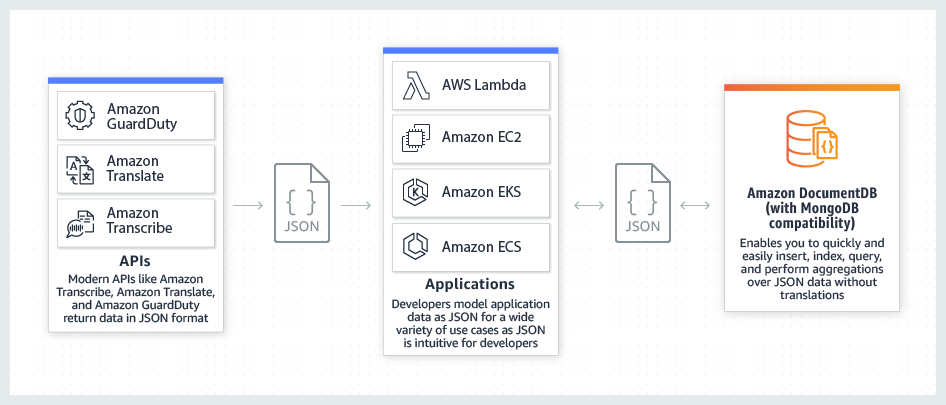
Amazon DocumentDB makes it easy to insert, query, index, and perform aggregations over JSON data.
Relational Database vs. JSON Document Database Terminology
The following table compares terminology used by JSON document databases with terminology used by relational databases using SQL.
| Relational database (SQL) | JSON document database |
|---|---|
| Table | Collection |
| Row | Document |
| Column | Field |
| Primary key | ObjectID |
| Index | Index |
| View | View |
| Nested table or object | Embedded document |
| Array | Array |
Use cases for a JSON document database
Content management
A JSON document database is a great choice for content management applications, such as blogs and video platforms, because each entity can be stored as a single JSON document. Should the data model need to change, only the affected documents need to be updated, with no need for schema updates and no database downtime required.
Catalogs
JSON document databases are efficient and effective for storing catalog information. For example, in an e-commerce app, different products usually have different numbers of attributes. These attributes can be described in a single JSON document for easy management and faster reading speed than would be possible with a relational database.
User profiles
JSON document databases are a good solution for online profiles in which different users provide different types of information. Using a JSON document database, you can store each user’s profile efficiently by storing only the attributes that are specific to each user. JSON document databases easily manage this level of individuality and fluidity.
Real-time big data
Being able to extract operational information in real time is critical in a highly competitive business environment. By using JSON document databases, a business can store and manage operational data from any source and concurrently feed the data to the BI engine of choice for analysis, with no need to have two separate environments.
Customers managing JSON data with Amazon DocumentDB
“We, the Deutsche Fußball Liga GmbH (DFL) use AWS to power our publishing platform, delivering the latest news from the league to millions of fans worldwide. As our content and user base grew, we had a focus on maintaining our relational database’s performance. We migrated to Amazon DocumentDB (with MongoDB compatibility) because of its flexible schema, native JSON support that enables our developers to deploy faster, and its decoupled architecture can scale our read throughput in minutes. We prototyped the application locally using the MongoDB Community Edition, and quickly deployed to production on Amazon DocumentDB. Everything worked just as we expected and we have successfully scaled our database performance.”
Andreas Heyden, CEO DFL Digital Sports, EVP Digital Innovations — DFL Group
FINRA regulates a critical part of the securities industry – brokerage firms doing business with the public in the United States. FINRA takes in up to 135 billion market events per day that are tracked, aggregated, and analyzed for the purpose of protecting investors.
“FINRA’s Data Collection platform stores millions of regulatory filings from hundreds of thousands customers, such as broker dealers, investment advisors, and stock exchanges. Our old platform was built using a relational database that stored data in XML, which had a rigid query structure and required us to write custom code for data versioning and schema validation. We chose Amazon DocumentDB because it natively stores data in JSON, making it simpler to query and index regulatory documents. This reduces our development cycles, while extending the usability of our data by easily integrating with other systems that leverage JSON. Because DocumentDB is a fully managed service, our databases are scalable, highly available, backed up, and encrypted without any overhead from our engineering teams.”
Ranga Rajagopal, Senior Director, Enterprise Data Platforms — FINRA
“At Habby, we use Amazon DocumentDB to store, query, and analyze both game player data and game operational data as well as data for promotional activities. Amazon DocumentDB is a natural and convenient choice for Habby as all of our game data is JSON and Amazon DocumentDB makes it easy to read and write that JSON data to the database. We chose Amazon DocumentDB because of the ease-of-management and its compatibility with MongoDB. We had initially planned to self-manage MongoDB on EC2 but found through testing that it was not convenient and required more work than we were willing to invest. With Amazon DocumentDB, our development team can scale, iterate, and upgrade games quickly, the marketing team can carry out high pertinence promotion activities, and our customer service team can troubleshoot problems from game players efficiently.”
Shuxiang Zhao, Chief Technology Officer — HABBY PTE.LTD.
Что такое база данных документов?
База данных документов – это тип баз данных NoSQL, предназначенный для хранения и запроса данных в виде документов в формате, подобном JSON. JavaScript Object Notation (JSON) – это открытый формат обмена данными, который читается как человеком, так и машиной. Разработчики могут использовать документы JSON в своем коде и сохранять их непосредственно в базе данных документов. Гибкий, полуструктурированный, иерархический характер документов и их баз данных позволяет им развиваться в соответствии с потребностями приложений.
В чем преимущества баз данных документов?
Базы данных документов обеспечивают гибкость индексации, производительность выполнения стандартных запросов и аналитику наборов документов. Подробнее о преимуществах – ниже.
Простота разработки
Документы JSON соответствуют объектам – распространенному типу данных в большинстве языков программирования. При разработке приложений разработчики могут гибко создавать и обновлять документы непосредственно из кода. Это означает, что они тратят меньше времени на предварительное создание моделей данных. Таким образом, разработка приложений происходит быстрее и эффективнее.
Гибкая схема
База данных, ориентированная на документы, позволяет создавать несколько документов с разными полями в одной коллекции. Это может быть удобно при хранении неструктурированных данных, таких как электронные письма или публикации в социальных сетях. Однако в некоторых базах данных документов предусмотрена проверка схемы, поэтому можно ввести некоторые ограничения для структуры.
Производительность при любом масштабе
Базы данных документов предлагают встроенные возможности распространения. Их можно горизонтально масштабировать на несколько серверов без снижения производительности, что также экономически выгодно. Кроме того, базы данных документов обеспечивают отказоустойчивость и доступность благодаря встроенной репликации.
Каковы варианты использования баз данных документов?
Модель документа хорошо подходит для каталогов, управления контентом и датчиками, и многого другого. Каждый документ для каждого случая использования уникален и развивается с течением времени.
Управление контентом
База данных документов – отличный выбор для приложений управления контентом, таких как платформы для блогов и размещения видео. При использовании базы данных документов каждая сущность, отслеживаемая приложением, может храниться как отдельный документ. База данных документов позволяет разработчику с удобством обновлять приложение при изменении требований. Кроме того, если необходимо изменить модель данных, то требуется обновление только затронутых этим изменением документов. Для внесения изменений нет необходимости обновлять схему и прерывать работу базы данных.
Каталоги
Документные базы данных эффективны для хранения каталожной информации. Например, в приложениях для интернет‑коммерции разные товары обычно имеют различное количество атрибутов. Управление тысячами атрибутов в реляционных базах данных неэффективно. Кроме того, количество атрибутов влияет на производительность чтения. При использовании базы данных документов атрибуты каждого товара можно описать в одном документе, что упрощает управление и повышает скорость чтения. Изменение атрибутов одного товара не повлияет на другие.
Управление датчиками
Интернет вещей (IoT) способствует тому, что организации стали регулярно собирать данные с интеллектуальных устройств, таких как датчики и счетчики. Данные датчиков обычно поступают в виде непрерывного потока переменных значений. Из-за проблем с задержкой некоторые объекты данных могут быть неполными или дублированными либо вовсе отсутствовать. Кроме того, необходимо собрать большой объем данных, прежде чем фильтровать или суммировать их для аналитики.
В этом случае удобнее использовать хранилища документов. Вы можете оперативно сохранять данные датчиков в том виде, в каком они есть, не занимаясь их очисткой или приведением в соответствие с заранее заданными схемами. Вы также можете масштабировать их по мере необходимости и удалять документы целиком после завершения анализа.
Как работают базы данных документов
В базах данных документов данные хранятся в виде пар «ключ-значение» в формате JSON. Чтение и запись документов в формате JSON в базы данных можно осуществлять программно.
Структура документов JSON
JSON представляет данные тремя способами:
Ключевое значение
Пары «ключ-значение» записаны в фигурных скобках. Ключ – это строка, а значение может быть любым типом данных, например целым, десятичным или логическим. Например, простое ключевое значение: .
Массив
Массив – это упорядоченный набор значений, определенных в левых ([) и правых (]) скобках. Элементы массива разделены запятыми. Например, .
Объекты
Объект – это набор пар «ключ-значение». По сути, документы JSON дают разработчикам возможность встраивать объекты и создавать вложенные пары. Например, >.
Пример документов JSON
В следующем примере в документе типа JSON описывается набор данных о фильме.
Code snippet copied
Можно заметить, что в документе JSON достаточно гибко хранятся простые значения, массивы и объекты. Можно даже создать массив с объектами JSON. Таким образом, базы данных, ориентированные на документы, позволяют создавать неограниченную иерархию встроенных объектов JSON. Какая схема будет использоваться в хранилище документов, зависит только от вас.
Операции с базой данных документов
Вы можете создавать, читать, обновлять и удалять целые документы, хранящиеся в базе данных. Базы данных документов предоставляют язык запросов или API, позволяющие разработчикам выполнять следующие операции:
Создание
В базе данных можно создавать документы. Каждый документ имеет уникальный идентификатор, который служит ключом.
Чтение
Для чтения данных документа можно использовать API или язык запросов. Можно выполнять запросы, используя значения полей или ключи, а также добавлять индексы в базу данных для повышения производительности чтения.
Обновление
Вы можете гибко обновлять существующие документы. Можно переписать весь документ или обновить отдельные значения.
В чем разница между базами данных документов и хранилищами пар «ключ-значение»?
База данных «ключ‑значение» – это база данных NoSQL, в которой для хранения данных используется простой метод «ключ‑значение». Это дает возможность хранить данные как совокупность пар «ключ‑значение», в которых ключ служит уникальным идентификатором. Как ключи, так и значения могут представлять собой что угодно: от простых до сложных составных объектов.
База данных, ориентированная на документы, – это особый тип хранилища пар «ключ-значение», где ключи могут быть только строками. Кроме того, документ кодируется с использованием таких стандартов, как JSON, или сопутствующих языков, таких как XML. Можно также хранить PDF-файлы, изображения или текстовые документы непосредственно в виде значений.
При запросе в хранилище документов вы можете прочитать значение или его часть, особенно если это значение является другим объектом JSON. Например, можно задать >, затем запросить book.price, и база данных вернет значение 10. Базы данных «ключ-значение» всегда возвращают целое значение с информацией об идентификаторе и цене.
Как AWS может удовлетворить ваши требования по работе с базой данных документов
Amazon DocumentDB (совместимость с MongoDB) – это полностью управляемый встроенный сервис баз данных документов JSON, поддерживающий рабочие нагрузки с документами, в том числе MongoDB. Для запуска и масштабирования рабочих нагрузок в Amazon DocumentDB, а также для управления ими разработчики могут использовать тот же код приложения, драйверы и инструменты MongoDB, с которыми работают сейчас. Вы получите усовершенствованную производительность, масштабируемость и доступность, не беспокоясь об управлении базовой инфраструктурой. С помощью Amazon DocumentDB вы сможете выполнять указанные ниже действия.
- Масштабировать до миллионов запросов на чтение и запись в секунду с помощью эластичных кластеров Amazon DocumentDB практически не влияя на производительность и не управляя базовой инфраструктурой.
- Повысить производительность чтения с использованием до 15 реплик чтения, работающих с одним и тем же базовым хранилищем, без необходимости выполнять запись на узлах реплик благодаря разделению хранения и вычислений.
- Автоматизировать недифференцированные задачи ручного управления базами данных без лицензионных платежей, в том числе в части аппаратного обеспечения, исправлений, настройки и многого другого.
- Обеспечить 99,99 % доступности с помощьюГлобальных кластеров Amazon DocumentDB для распределенных по всему миру приложений, поддерживающих высокую производительность локального чтения.
- Получить надежность в 99,99 % за счет автоматической репликации, непрерывного резервного копирования и строгой сетевой изоляции.
- Добиться высокой надежности и долговечности благодаря отказоустойчивому и самовосстанавливающемуся хранилищу, восстановлению на момент времени, непрерывному резервному копированию и многим другим функциям. Amazon DocumentDB обеспечивает долговечность данных в трех зонах доступности в пределах одного региона за счет репликации новых записей шестью способами. При этом вы платите только за одну копию.
- Воспользоваться высокой степенью защиты благодаря стандартному шифрованию при хранении, сетевой изоляции и расширенному аудиту, а также возможностью управления разрешениями на уровне ресурсов и точным доступом.
- Извлечь пользу из широкого охвата соответствия требованиям, включая SOC (1, 2 и 3), PCI DSS, HIPAA и многим другим.
Начните работу с базами данных документов на AWS, создав бесплатный аккаунт уже сегодня!