VT-x и VT-d: что это такое в биосе и зачем нужно?
Всем приветандр Хочу вам рассказать о таком как VT-d и VT-x, что это такое и для чего нужно. В общем ничего особо сложного нет, да и не особо важно это вообще, ну то есть многим юзерам такие опции как VT-x и VT-d попросту не нужны и они могут быть спокойно отключены.
Значит что такое VT-x и VT-d? Это технологии виртуализации, которые нужны для виртуальных машин (может и для еще какого-то софта, но я не знаю). Технологии виртуализации есть как у Intel (VT-x, VT-d), так и у AMD (называется AMD-V) и позволяют виртуальной машине обращаться к процессору напрямую, а не, так бы сказать через программную прослойку. Благодаря этому, виртуальная машина работает почти также как и реальная система.
Обычным юзерам, которые играют в игры, смотрят фильмы на компе, слушают музыку, то им эти технологии не нужны вообще. Поэтому логично их будет отключить. А вот если вы пользуетесь виртуальными машинами, то конечно их нужно в таком случае включить, ибо без них, виртуальные машины хоть и будут работать, но страшно медленно.
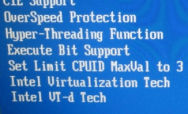
Чтобы включить технологию виртуализации, то нужно в биосе найти такое как Virtualization Technology и выбрать значение Enabled, ну примерно как-то так. Просто названия могут отличаться. Вот пример настройки в биосе асусовской материнки:

В более старых биосах все аналогично:
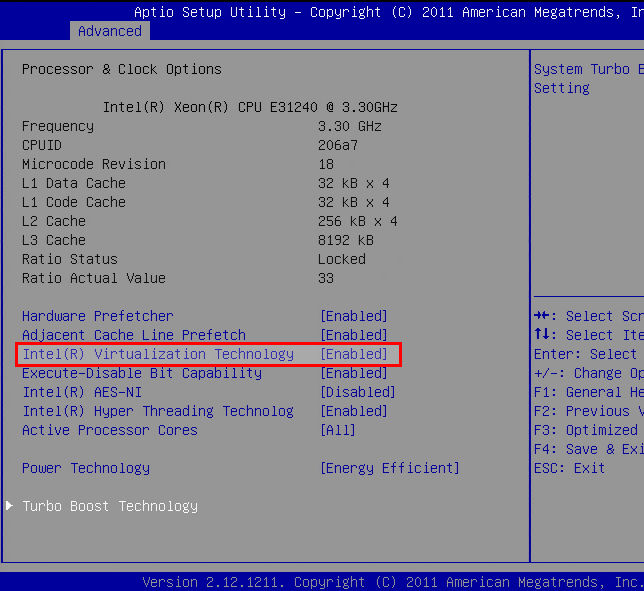
Как VT-x, так и VT-d, все они включаются одинаково. Просто VT-x может просто называться Intel(R) Virtualization Technology, ибо это базовая виртуализация.
Но в чем разница между VT-x и VT-d, в чем отличия то? А вот это уже немного интересно. Как я уже написал, VT-x это базовая виртуализация, она позволяет напрямую слать команды процессору, чтобы виртуальная машина могла работать почти также быстро как и реальная система. А вот VT-d это уже другое, это для того, чтобы вы могли в виртуальную машину перекидывать целые устройства на шине PCI. То есть можно например в прямом смысле кинуть видеокарту в виртуалку и она там будет работать, только нужно будет поставить драйвера на видюху, ну как все обычно. Но VT-d нет в дешевых процессорах, как правило поддержка есть только у более дорогих моделях.
Вообще сама VT-x появилась достаточно давно, ну вот первый раз, если я не ошибаюсь, то она появилась в процессорах Pentium 4, модели 662 и 672. Это одноядерные процессоры, но очень топовые в прошлом, стояли кучу денег! Они одноядерные, но зато имели два потока, что только прибавляло им крутости по тем временам, эх, крутые процессоры были что не говори!
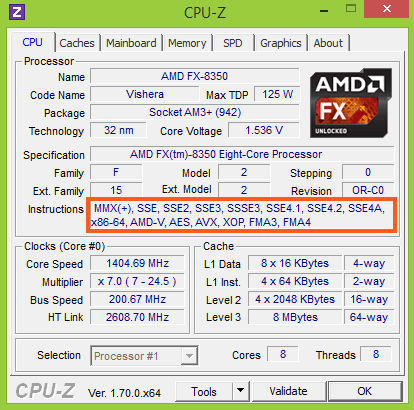
Как узнать, есть ли поддержка VT-x, VT-d? Очень просто, самый лучший способ, самый быстрый, это просто скачать утилиту CPU-Z, там вы в поле Instructions сможете легко понять поддерживает ли ваш процессор эту технологию:

С процессорами AMD все аналогично, только тут нужно искать AMD-V:
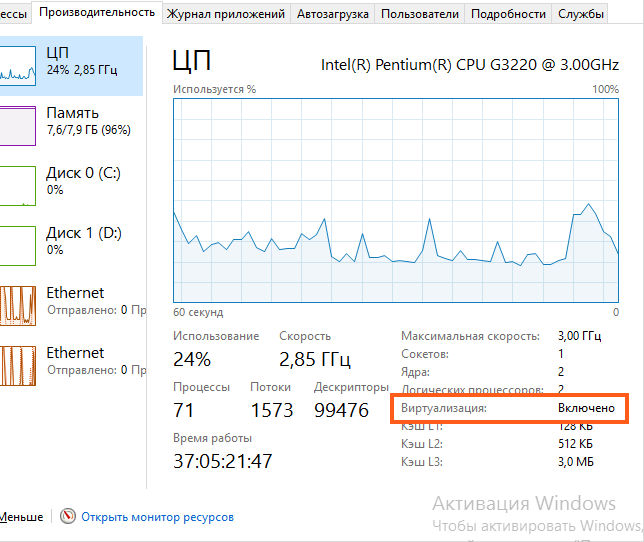
Также в Windows 10 можно легко посмотреть, включена виртуализация или нет. Для этого нужно зайти в диспетчер задач и там на вкладке Производительность у вас будет написано, включена она или нет:
Немного напишу и о самих виртуальных машинах. Значит всего есть две, это самые популярные: VMware Workstation и VirtualBox. Принципиальных отличий у них можно сказать что нет, если не учитывать, что VirtualBox полностью бесплатная. Но лично я отдаю предпочтение VMware, так как она реально быстрее. Но это мое мнение, есть много тех, кто уверен в обратном, что VirtualBox быстрее. Так что я думаю тут будет лишним думать что лучше, ибо лучше просто взять и проверить, как сделал я и уже не один раз приходил к выводу, что VMware таки быстрее..
Кстати, у VMware также есть полностью бесплатная версия виртуальной машины, которой я пользуюсь уже не первый год, это VMware Player. Там нет многих функций, но на самом деле, теми многими функциями мало кто пользуется. Все что нужно, это все есть: можно создавать виртуальные машины, редактировать конфиг, запускать машины, все работает стабильно! Нет разве что фоновой работы машины, ну и еще чего-то, так бы сказать не особо существенного.
Кстати, был у меня как-то самый мощный одноядерный процессор, а это Pentium 4 670 (в отличии от модели 672, тут нет виртуализации), ну и я на нем тоже запускал виртуальную машину. Ну потому что это мне ну очень нужно было. Конечно работало все очень медленно. Но тот софт, который мне нужно было запустить в этой виртуальной машине, то он работал. Просто медленно, но все таки работал! Правда этот Pentium 4 670 нагревался просто дико.. Это ужас.. Зимой зато было реально в моей комнате теплее…
Ну в общем вот такие дела ребята, надеюсь что все вам тут было понятно. Удачи вам в жизни и хорошего настроенчика
Vtd azalea vcp optimizations это что
Success! Subscription added.
Success! Subscription removed.
Sorry, you must verify to complete this action. Please click the verification link in your email. You may re-send via your profile.
- Intel Community
- Developer Software Forums
- Software Archive
- Intel VT-D and Intel X99 motherboards
17061 Discussions
Intel VT-D and Intel X99 motherboards
- Subscribe to RSS Feed
- Mark Topic as New
- Mark Topic as Read
- Float this Topic for Current User
- Bookmark
- Subscribe
- Mute
- Printer Friendly Page
02-20-2015 02:58 AM
5,781 Views
- Mark as New
- Bookmark
- Subscribe
- Mute
- Subscribe to RSS Feed
- Permalink
- Report Inappropriate Content
I am thinking of buying a X99 motherboard that I can
use for Vmware Workstation.
The two brands that I am thinking of are ASUS and GigaByte.
I have been looking into the Virtualization and plan on
running VMWare Workstation 11. So virtualize windows Server 2012,
Windows 8.1 etc. Plus VMWare ESXi.
So I think for the last one I need Vt-d.
Now I have notice the the ASUS MB’s have a few more options for
VTD like:
Vtd Azalea VCp optimizations.
Interrupt Remapping
Coherency Support (Non-ISoch)
Coherency Support (ISoch)
However the GigaByte board only allows me to turn VT-d on and off.
So since I can’t control these options would they be on by default
on the GigaByte, is there anything ‘Disadvantage’ I have not being
able to control them? (Or is all this a bit of a non-issue ?)
BTW — I can understand people here might not know specifically about
VMWare or the motherboards in question. For example I am wondering
if say a board supports VT-d means that these options are inclusive
and likely to be enabled etc.
Activating the Intel VT-d Virtualization Feature
Intel has been offering Intel Virtualization Technology for Directed I/O (Intel VT-d) as of the Nehalem micro-architecture (Xeon 34xx, 55xx and more systems, see Intel Microarchitecture Overview). We will describe how you can activate Intel VT-d from the BIOS in this article.
To use Intel VT-d, both the chipset and the BIOS must support VT-d. You will find additional details about Intel VT-d in the Overview of the Intel VT Virtualization Features article.
Contents
- 1 Intel MFS5520VI Compute Module Example
- 1.1 Deactivating VT-d
- 1.2 Activating VT-d
- 1.3 Activating VT-d Additional Options
- 2.1 Deactivating VT-d
- 2.2 Activating VT-d
- 2.3 Activated VT-d
Intel MFS5520VI Compute Module Example
We will use an Intel MFS5520VI Compute Module with two Intel Xeon E5506 CPUs in the first example.
Deactivating VT-d
VT-d is disabled by default. You will find the setting for VT-d in the BIOS under Advanced —> Processor Configuration —> Intel(R) VT for Directed I/O.
The following helpful information will be displayed in the right column of this view:
Enable/Disable Intel (R) Virtualization Technology for Directed I/O. Report the I/O device assignment to VMM through DMAR ACPI tables.
A screenshot like the message on the screen will look like this:

Activating VT-d
We will enable VT-d in the next step.

Activating VT-d Additional Options
Enabling VT-d opens three additional options:
- coherency support (enable/disable Intel(R) VT-d coherency support, disabled by default)
- ATS support (enable/disable Intel(R) VT-d address translation services (ATS) support, enabled by default) [1]
- Pass-through DMA Support (enable/disable Intel(R) VT-d pass-through DMA support, enabled by default)
This screenshot shows these options.

Supermicro X8DT3-F Example
We will show a server with a Supermicro X8DT3-F motherboard and two Intel Xeon X5680 CPUs in this second example.
Deactivating VT-d
VT-d is disabled by default. You will find the setting for VT-d in the BIOS under Advanced —> Advanced Chipset Control —> North Bridge Configuration —> Intel VT-d.


Activating VT-d
We will enable VT-d in the next step.

Activated VT-d
VT-d has now been enabled.

References
Additional Information
- Intel Virtualization Technology for Directed I/O (Intel VT-d) (intel.com)
Werner Fischer, working in the Knowledge Transfer team at Thomas-Krenn, completed his studies of Computer and Media Security at FH Hagenberg in Austria. He is a regular speaker at many conferences like LinuxTag, OSMC, OSDC, LinuxCon, and author for various IT magazines. In his spare time he enjoys playing the piano and training for a good result at the annual Linz marathon relay.
Vtd azalea vcp optimizations это что
I recently bought a JGINYUE X99-D8 to use with my home lab. However before I bought it I couldn’t find much info about it, such as if it it supported SR-IOV or even virtualisation at all. Here’s all the BIOS options that shipped with my motherboard.
The Motherboard Drivers and BIOS are available on jginyue.com.cn.
I’ve also made a custom lm-sensors config file for this motherboard.
All of this article is my own findings but Miyconst’s video is worth checking out.
Important Features & Notes
AER Errors
If you experience AER errors in Linux, they can be avoided by disabling PCI-E ASPM, you will need to disable it globally and then go through each IIO Socket setting PCI-E ASPM to Disabled. This is common with other X99 motherboards.
Virtualisation
- SR-IOV
- VT-x
- VT-d
- ACS
- ARI Forwarding
Networking
- 2 × RTL8111/8168/8411 PCI Express Gigabit Ethernet Controllers
- Capabilities: pm msi pciexpress msix bus_master cap_list ethernet physical tp mii 10bt 10bt-fd 100bt 100bt-fd 1000bt-fd autonegotiation
- Supports Wake-on: pumbg (PHY, Unicast, Multicast, Broadcast, Magic Packet)
PCIe Slots
- PCIe 2.0 x1 — Chipset
- PCIe 3.0 x4 (M.2 M Key) — CPU0
- PCIe 3.0 x16 — CPU0
- PCIe 2.0 x1 — Chipset
- PCIe 3.0 x4 (M.2 M Key) — CPU1
- PCIe 3.0 x16 — CPU1
- PCIe 3.0 x8 (Physically x16) — CPU0
The PCIe x1 slots can easily be cut open using small side cutters to fit a card bigger than x1, but using a bigger card will obstruct an M.2 SSD.
Miscellaneous
- SATA 3.0, using SATA & sSATA Controllers
- 8 Channel RAM (2 CPUs × 4 Channels)
- PCIe Bifurcation Settings
- ECC & Non-ECC RAM Supported
dmidecode BIOS Information
Handle 0x0000, DMI type 0, 24 bytes BIOS Information Vendor: American Megatrends Inc. Version: 5.11 Release Date: 05/14/2021 Address: 0xF0000 Runtime Size: 64 kB ROM Size: 8 MB Characteristics: PCI is supported BIOS is upgradeable BIOS shadowing is allowed Boot from CD is supported Selectable boot is supported BIOS ROM is socketed EDD is supported 5.25"/1.2 MB floppy services are supported (int 13h) 3.5"/720 kB floppy services are supported (int 13h) 3.5"/2.88 MB floppy services are supported (int 13h) Print screen service is supported (int 5h) 8042 keyboard services are supported (int 9h) Serial services are supported (int 14h) Printer services are supported (int 17h) ACPI is supported USB legacy is supported BIOS boot specification is supported Targeted content distribution is supported UEFI is supported BIOS Revision: 5.11(Almost) All BIOS Options
Main
- BIOS Vendor
- Core Version
- Compliancy
- Project Version
- Build Date and Time
- Access Level
- Total Memory
- System Language
- System Date
- System Time
Advanced
- ACPI Settings
- Enable ACPI Auto Configuration
- Enable Hibernation
- Lock Legacy Resources
- Super IO Chip
- Serial Port 1 Configuration
- Serial Port
- Device Settings
- Change Settings
- Smart Fan Function
- Smart Fan Mode Configuration
- Cpu Fan Mode
- Cpu Smart FanIV T1 Temp
- Cpu Smart FanIV T2 Temp
- Cpu Smart FanIV T3 Temp
- Cpu Smart FanIV T4 Temp
- iSCSI Initiator Name
- Add an Attempt
- Delete Attempts
- Change Attempt Order
- PCI Latency Timer
- PCI-X Latency Timer
- VGA Pallet Snoop
- PERR# Generation
- SERR# Generation
- Above 4G Decoding
- SR-IOV Support
- BME DMA Mitigation
- PCI Express Settings
- Relaxed Ordering
- Extended Tag
- No Snoop
- Maximum Payload
- Extended Synch
- Link Training Retry
- Like Training Timeout (uS)
- Restore PCIE Registers
- Completion Timeout
- ARI Forwarding
- AtomicOp Register Enable
- AtomicOp Egress Blocking
- ID0 Request Enable
- ID0 Completion Enable
- LTR Mechanism Enable
- End-End TLP Prefix Blocking
- Clock Power Management
- Compliance SOS
- Hardware Autonomous Width
- Hardware Autonomous Speed
- Network Stack
- Ipv4 PXE Support
- Ipv6 PXE Support
- PXE boot wait time
- Media detect count
- CSM Support
- GateA20 Active
- Option ROM Messages
- Boot option filter
- Network
- Storage
- Video
- Other PCI devices
- Legacy USB Support
- XHCI Hand-off
- EHCI Hand-off
- USB Mass Storage Driver Support
- USB transfer time-out
- Device reset time-out
- Device power-up delay
IntelRCSetup
- Processor Configuration
- Per-Socket Configuration
- Hyper-Threading [ALL]
- Check CPU BIST Result
- Monitor/Mwait
- Execute Disable Bit
- Enable Intel TXT Support
- VMX
- Enable SMX
- Lock Chipset
- MSR Lock Control
- PPIN Control
- DEBUG INTERFACE
- Hardware Prefetcher
- Adjacent Cache Prefetch
- DCU Stream Prefetcher
- DCU IP Prefetcher
- DCU Mode
- Direct Cache Access (DCA)
- DCA Prefetch Delay
- X2APIC
- AES-NI
- Down Stream PECI
- IIO LLC Ways [19:0](Hex)
- QLRU Config [63:32](Hex)
- QLRU Config [31:0](Hex)
- SMM Save State
- Targeted Smi
- Power Technology
- Config TDP
- IOTG Setting
- Uncore CLR Freq OVRD
- CPU P State Control
- EIST (P-states)
- Turbo Mode
- P-state coordination
- SPD
- PL2_SAFETY_NET_ENABLE
- Boot performance mode
- C2C3TT
- Package C State limit
- CPU C3 report
- CPU C6 report
- ACPI T-States
- Energy Perf BIAS
- Energy Performance Tuning
- Energy Performance BIAS setting.
- Power/Performance Switch
- Workload Configuration
- Averaging Time Window
- P0 TotalTimeThreshold Low
- P0 TotalTimeThreshold High
- FAST_RAPL_NSTRIKE_PL2_DUTY_CYCLE
- Turbo Pwr Limit Lock
- Long Pwr Limit Ovrd
- Long Dur Pwr Limit
- Long Dur Time Window
- Pkg Clmp Lim1
- Short Dur Pwr Limit En
- Short Dur Pwr Limit
- Pkg Clmp Lim2
- DRAM RAPL Baseline
- Overrife BW_LIMIT_TF
- DRAM RAPL Extended Range
- MMIOHBase
- MMIO High Size
- Isoc Mode
- MeSeg Mode
- Numa
- QPI General Configuration
- QPI Status
- Degrade Precedence
- Link Frequency Select
- Link L0p Enable
- Link L1 Enable
- Legacy VGA Socket
- MMIO P2P Disable
- E2E Parity Enable
- COD Enable
- Early Snoop
- Home Dir Snoop with IVT- Style OSB
- QPI Debug Print Level
- CPU 0, CPU 1, CPU 2, CPU 3
- Bus Resources Allocation Ratio
- IO Resources Allocation Ratio
- MMIOL Resources Allocation Ratio
- IIO Disable
- Enforce POR
- PPR Type
- Memory Frequency
- MRC Promote Warnings
- Promote Warnings
- Halt on mem Training Error
- Multi-Threaded MRC
- Enforce Timeout
- Enhanced Log Parsing
- BSSA Module Loading
- Backside RMT
- Rank Multiplication
- LRDIMM Module Delay
- MemTest
- MemTestLoops
- Dram Maintenance Test
- Dram Maintenance Test Direction
- Dram Maintenance Test Invertion
- Dram Maintenance Test Repetitions
- Dram Maintenance Test Interation o
- Dram Maintenance Test Swizzle enabling
- Dram Maintenance Test Refresh enabling
- Memory Type
- CECC WA CH mask
- Rank Margin Tool
- RMT Pattern Length
- CMD Pattern Length
- Per Bit Margin
- Training Result Offset Config
- Attempt Fast Boot
- Attempt Fast Cold Boot
- BDAT
- Data Scrambling
- Allow SBE during training
- Platform type input for SPD page s
- CAP ERR FLOW feature Control
- Scrambling Seed Low
- Scrambling Seed High
- Enable ADR
- MC BGF threshold
- DLL Reset Test
- MC ODT Mode
- Opp read during WMM
- Normal Operation Duration
- Number of Sparing Transaction
- PSMI Support
- C/A Parity Enable
- SMB Clock Frequency
- Memory Topology
- Memory Thermal
- Set Throttling Mode
- OLTT Peak BW %
- Phase Shedding
- Memory Power Savings Mode
- Memory Power Savings Advanced Options
- CK in SR
- DIMM profile
- Memory Frequency
- Socket Interleaving Below 4GB
- Channel Interleaving
- Rank Interleaving
- IOT Memory Buffer Reservation
- A7 Mode
- RAS Mode
- Lockstep x4 DIMMs
- Memory Rank Sparing
- Correctable Error Threshold
- Leaky bucket low bit
- Leaky bucket hight bit
- DRAM Maintenance
- Patrol Scrub
- Patrol Scrub Interval
- Demand Scrub
- Device Tagging
- Memory Power Management
- PCIe Train by BIOS
- PCIe Hot Plug
- PCIe ACPI Hot Plug
- EV DFX Features
- IIO0 Configuration
- IOU2 (IIO PCIe Port 1)
- IOU0 (IIO PCIe Port 2)
- IOU1 (IIO PCIe Port 3)
- No PCIe port active EC0
- Socket 0 PcieD00F0 — Port 0/DMI
- Link Speed
- Override Max Link Width
- PCI-E Port DeEmphasis
- PCI-E Port Link Status
- PCI-E Port Link Max
- PCI-E Port Link Speed
- PCI-E Port L0s Exit Latency
- PCI-E Port L1 Exit Latency
- Fatal Err Over
- Non-Fatal Err Over
- Corr Err Over
- L0s Support
- PCI-E Port
- Hot Plug Capable
- Extra Bus Reserved
- Reserved Memory
- Reseved Memory Alignment
- Prefetchable Memory
- Prefetchable Memory Alignment
- Reserved I/O
- PCI-E Port Link
- Link Speed
- Override Max Link Width
- PCI-E Port DeEmphasis
- PCI-E Port Link Status
- PCI-E Port Link Max
- PCI-E Port Link Speed
- PCI-E Port L0s Exit Latency
- PCI-E Port L1 Exit Latency
- Fatal Err Over
- Non-Fatal Err Over
- Corr Err Over
- L0s Support
- PM ACPI Mode
- Gen3 Eq Mode
- Gen3 Spec Mode
- Gen3 Phase2 Mode
- Gen3 DN Tx Preset
- Gen3 DN Rx Preset
- Gen3 UP Tx Preset
- Hide Port?
- PCI-E Port
- Hot Plug Capable
- Extra Bus Reserved
- Reserved Memory
- Reseved Memory Alignment
- Prefetchable Memory
- Prefetchable Memory Alignment
- Reserved I/O
- PCI-E Port Link
- Link Speed
- Override Max Link Width
- PCI-E Port DeEmphasis
- PCI-E Port Link Status
- PCI-E Port Link Max
- PCI-E Port Link Speed
- PCI-E Port L0s Exit Latency
- PCI-E Port L1 Exit Latency
- Fatal Err Over
- Non-Fatal Err Over
- Corr Err Over
- L0s Support
- PM ACPI Mode
- Gen3 Eq Mode
- Gen3 Spec Mode
- Gen3 Phase2 Mode
- Gen3 DN Tx Preset
- Gen3 DN Rx Preset
- Gen3 UP Tx Preset
- Hide Port?
- PCI-E Port
- Hot Plug Capable
- Extra Bus Reserved
- Reserved Memory
- Reseved Memory Alignment
- Prefetchable Memory
- Prefetchable Memory Alignment
- Reserved I/O
- PCI-E Port Link
- Link Speed
- Override Max Link Width
- PCI-E Port DeEmphasis
- PCI-E Port Link Status
- PCI-E Port Link Max
- PCI-E Port Link Speed
- PCI-E Port L0s Exit Latency
- PCI-E Port L1 Exit Latency
- Fatal Err Over
- Non-Fatal Err Over
- Corr Err Over
- L0s Support
- PM ACPI Mode
- Gen3 Eq Mode
- Gen3 Spec Mode
- Gen3 Phase2 Mode
- Gen3 DN Tx Preset
- Gen3 DN Rx Preset
- Gen3 UP Tx Preset
- Hide Port?
- IOU2 (IIO PCIe Port 1)
- IOU0 (IIO PCIe Port 2)
- IOU1 (IIO PCIe Port 3)
- No PCIe port active EC0
- Socket 0 PcieD00F0 — Port 0/DMI
- PCI-E Port
- Hot Plug Capable
- Extra Bus Reserved
- Reserved Memory
- Reseved Memory Alignment
- Prefetchable Memory
- Prefetchable Memory Alignment
- Reserved I/O
- PCI-E Port Link
- Link Speed
- Override Max Link Width
- PCI-E Port DeEmphasis
- PCI-E Port Link Status
- PCI-E Port Link Max
- PCI-E Port Link Speed
- PCI-E Port L0s Exit Latency
- PCI-E Port L1 Exit Latency
- Fatal Err Over
- Non-Fatal Err Over
- Corr Err Over
- L0s Support
- PM ACPI Mode
- Gen3 Eq Mode
- Gen3 Spec Mode
- Gen3 Phase2 Mode
- Gen3 DN Tx Preset
- Gen3 DN Rx Preset
- Gen3 UP Tx Preset
- Hide Port?
- PCI-E Port
- Hot Plug Capable
- Extra Bus Reserved
- Reserved Memory
- Reseved Memory Alignment
- Prefetchable Memory
- Prefetchable Memory Alignment
- Reserved I/O
- PCI-E Port Link
- Link Speed
- Override Max Link Width
- PCI-E Port DeEmphasis
- PCI-E Port Link Status
- PCI-E Port Link Max
- PCI-E Port Link Speed
- PCI-E Port L0s Exit Latency
- PCI-E Port L1 Exit Latency
- Fatal Err Over
- Non-Fatal Err Over
- Corr Err Over
- L0s Support
- PM ACPI Mode
- Gen3 Eq Mode
- Gen3 Spec Mode
- Gen3 Phase2 Mode
- Gen3 DN Tx Preset
- Gen3 DN Rx Preset
- Gen3 UP Tx Preset
- Hide Port?
- PCI-E Port
- Hot Plug Capable
- Extra Bus Reserved
- Reserved Memory
- Reseved Memory Alignment
- Prefetchable Memory
- Prefetchable Memory Alignment
- Reserved I/O
- PCI-E Port Link
- Link Speed
- Override Max Link Width
- PCI-E Port DeEmphasis
- PCI-E Port Link Status
- PCI-E Port Link Max
- PCI-E Port Link Speed
- PCI-E Port L0s Exit Latency
- PCI-E Port L1 Exit Latency
- Fatal Err Over
- Non-Fatal Err Over
- Corr Err Over
- L0s Support
- PM ACPI Mode
- Gen3 Eq Mode
- Gen3 Spec Mode
- Gen3 Phase2 Mode
- Gen3 DN Tx Preset
- Gen3 DN Rx Preset
- Gen3 UP Tx Preset
- Hide Port?
- PCI-E Port
- Hot Plug Capable
- Extra Bus Reserved
- Reserved Memory
- Reseved Memory Alignment
- Prefetchable Memory
- Prefetchable Memory Alignment
- Reserved I/O
- PCI-E Port Link
- Link Speed
- Override Max Link Width
- PCI-E Port DeEmphasis
- PCI-E Port Link Status
- PCI-E Port Link Max
- PCI-E Port Link Speed
- PCI-E Port L0s Exit Latency
- PCI-E Port L1 Exit Latency
- Fatal Err Over
- Non-Fatal Err Over
- Corr Err Over
- L0s Support
- PM ACPI Mode
- Gen3 Eq Mode
- Gen3 Spec Mode
- Gen3 Phase2 Mode
- Gen3 DN Tx Preset
- Gen3 DN Rx Preset
- Gen3 UP Tx Preset
- Non-Transparent Bridge PCIe Port D
- Enable NTB BARs
- Enable SPLIT BARs
- Primary BAR 23 Size
- Primary BAR 4 Size
- Primary BAR 5 Size
- Secondary BAR 23 Size
- Secondary BAR 4 Size
- Secondary BAR 5 Size
- Crosslink control Override
- Hide Port?
- Enable IOAT
- No Snoop
- Disable TPH
- Relaxed Ordering
- Apply BDX CBDMA ECO
- IIOAPIC
- VTd Azalea VCp Optimizations
- Intel VT for Directed I/O (VT-d)
- ACS Control
- Interrupt Remapping
- Coherency Support (Non-Isoch)
- Coherency Support (Isoch)
- PCH Devices
- Board Capability
- DeepSx Power Policies
- GP27 Wake From DeepSx
- SMBUS Device
- PCH Server Error Reporting Mode (S
- PCH Display
- Serial IRQ Mode
- External SSC Enable — CK420
- PCH state after G3
- PCH CRID
- sSATA Controller
- Configure sSATA as
- SATA test mode
- SATA Mode options
- SATA HDD Unlock
- SATA Led locate
- Port 0
- Hot Plug
- Configure as eSATA
- Mechanical Presence Switch
- Spin Up Device
- sSATA Device Type
- SATA Controller
- Configure SATA as
- SATA test mode
- SATA Mode options
- SATA HDD Unlock
- SATA Led locate
- Port 0
- Hot Plug
- Configure as eSATA
- Mechanical Presence Switch
- Spin Up Device
- SATA Device Type
- USB Precondition
- xHCI Mode
- Trunk Clock Gating (BTCG)
- USB Ports Per-Port Disable Control
- XHCI Idle L1
- USB XHCI s755 WA
- USB XHCI Interrupt Remap WA
- GPIO Lockdown
- RTC Lock
- BIOS Lock
- Host Flash Lock-Down
- Gbe Flash Lock-Down
Security
- Administrator Password
- User Password
Boot
- Setup Prompt Timeout
- Bootup NumLock State
- Quiet Boot
- Boot Option Priorities
Save & Exit
- Save Changes and Exit
- Discard Changes and Exit
- Save Changes and Reset
- Discard Changes and Reset
- Save Changes
- Discard Changes
- Restore Defaults
- Save as User Defaults
- Restore User Defaults
- Boot Override
Additional Notes
If you’re wondering what some of those options even do, looking though the manual of a similar X99 or C600 motherboard can help.
For example here’s the manual for a X10DRi-T4+.Thanks for reading!
Steve.