Execute Disable Bit
Другие идентичные названия опции: No-Execute Memory Protect, Execute Disable Function.

В BIOS существует несколько опций, предназначенных для обеспечения безопасности компьютера. Одной из таких опций является функция Execute Disable Bit (бит запрета исполнения кода). Ее назначение – включение режима работы процессора, обеспечивающего пользователю защиту от некоторых распространенных уязвимостей программного кода и угроз информационной безопасности. Опция имеет два значения – Enabled (Включено) и Disabled (Выключено).
Принцип работы
Опция тесно связана с таким понятием, как DEP (Data Execution Prevention, предотвращение выполнения данных). Суть данной технологии заключается в следующем В памяти компьютера существует два отдельных раздела, один из которых предназначен для данных, а другой – для исполняемых команд. При этом в процессоре присутствует особый бит состояния (бит NX, No Execution Bit), установка которого позволит процессору не использовать информацию из раздела данных в качестве исполняемых команд. Именно для установки этого бита и служит опция Execute Disable Bit.
Использование технологии DEP позволяет в ряде случаев избежать рисков для безопасности данных компьютера, связанных с ошибкой переполнения буфера. Эта ошибка часто используется различными троянскими программами и вирусами. Для того, чтобы данная технология обеспечивала максимальную защиту, она должна поддерживаться процессором, операционной системой и прикладными программами.
Большинство современных операционных систем поддерживают технологию DEP. К числу этих ОС относятся Windows XP, Vista, Windows 7 и 8. Кроме того, технологию поддерживают современные ОС семейства UNIX и Linux. В семействе операционных систем Windows поддержку DEP можно отрегулировать в разделе «Система» Панели Управления.
На уровне процессоров технология DEP впервые получила поддержку в процессорах AMD Athlon, а затем была внедрена в процессорах Intel – начиная с линейки Pentium 4 и Celeron. Именно AMD ввела в обиход термин «NX-бит», а в процессорах Intel данный бит носит названия XD-бита.
Стоит ли включать опцию?
В большинстве случаев опцию Execute Disable Bit необходимо включить, чтобы обезопасить компьютер от хакерских атак, троянских программ, вирусов и «червей», использующих метод переполнения буфера. Разумеется, включение бита запрета исполнения кода процессора не является панацеей, защищающей пользователя от всех возможных информационных угроз, но оно может стать серьезным подспорьем для других средств защиты компьютера, прежде всего программных.
На уровне операционной системы технология работает даже в том случае, если процессор ее не поддерживает, или бит NX в нем отключен. Однако в этом случае эффективность защиты компьютера будет снижена.
Тем не менее, встречается программное обеспечение, которое не совместимо с технологией DEP и при этом не относится к категории вредоносных программ. Для того, чтобы позволить функционировать подобному ПО, в BIOS и предусмотрена возможность отключения опции. Таким образом, опцию следует установить в значение Disabled только в том случае, если вы используете подобное ПО.
NX-Bit
NX-Bit (No eXecute Bit — в AMD), или XD-Bit (Execute Disable Bit — в Intel) — антивирус, способный предотвратить «заражение» ПК некоторыми типами вредоносного ПО. Борется с искусственно-вызванной ошибкой переполнения буфера. С данным антивирусом имеет тесную связь технология Microsoft DEP.
Технология может работать только если:
- Имеется поддержка процессора на аппаратном уровне (от Intel Pentium 4 серии 6xx и выше, а также все модификации AMD Athlon 64);
- Установлена ОС с поддержкой данной технологии (Linux с ядром, начиная от версии 2.3.23; Windows XP Service Pack 2 и выше);
- Применяется PAE или архитектура x86-64.
Иногда технология способна вызвать конфликт программного характера с некоторыми видами программного обеспечения. Так, в BIOS’е материнских плат, поддерживающих процессоры с EDB, имеется возможность отключения этой технологии.
NX (XD) — атрибут страницы памяти, употребляемый в архитектурах x86 и x86-64, предназначенный для укрепления защиты системы от программных ошибок, вирусов, троянских коней и других вредоносных программ.
NX-bit — самый старший разряд элемента 64-битных таблиц страниц, которые применяются процессором для распределения памяти в адресном пространстве. 64-разрядные таблицы страниц используются только в ОС, работающих в 64-битном режиме, либо с включенным расширением физических адресов (PAE).
В настоящее время, компьютерные системы обладают памятью, разделенной на страницы с определенными атрибутами. Так, в новые серии продуктов разработчики процессоров добавили еще один атрибут — запрет исполнения кода на странице (страница может быть использована для хранения данных, но не для хранения программного кода). В случае возникновения попытки передать управление на подобного рода страницу, процессор генерирует специальную ошибку страницы, и программа прекращает свою работу в аварийном порядке.
Атрибут защиты от исполнения внедряли и в другие микропроцессорные архитектуры, но только в x86-системах эта защита реализовывалась на уровне программных сегментов. Сегодня такая защита внедрена и на уровне отдельных страниц.
В современных ПО наблюдается четкое разделение на сегменты кода («text»), данных («data») и неинициализированных данных («bss»). Кроме того, имеется и динамически-распределяемый сегмент памяти, который, в свою очередь, делится на:
- кучу («heap»);
- программный стек («stack»).
Если при написании программы не было допущено никаких ошибок, указатель команд не выйдет за пределы сегментов кода. Но в случае программных ошибок, управление может быть передано в другие области памяти. Это повлечет за собой блокирование процессора перед операциями по запрограммированным действиям, и начало произвольного выполнения случайной последовательности команд. Так будет продолжаться до тех пор, пока процессор не идентифицирует недопустимую последовательность, тогда сработает внутренняя система защиты. Так или иначе, программа завершится аварийно. Кроме того, процессору может попасться последовательность, которая интерпретируется как команда перехода к пройденному адресу. В этом случае, процессор попадет в бесконечный цикл, а программа «зависнет». Чтобы предотвратить подобные случаи, специалисты ввели дополнительный атрибут, который определяет следующее условие: если какая-то область памяти не предназначена для хранения программного кода, то все ее страницы должны помечаться NX-битом, а в случае возникновения попытки передать управление, процессор сформирует команду, и операционная система мгновенно завершит программу. Ключевой причиной введения данного атрибута было не столько обеспечение быстрой реакции на такие ошибки, сколько распространенность подобных ошибок среди злоумышленников, которые использовали их для несанкционированного доступа к ПК. Написанные ими всевозможные вирусы и черви искали уязвимые места в распространенных ПО.
Тех. детали
Зачастую, буфер переполняется в тех случаях, когда разработчик делает его фиксированной длины. Полагая, что отведенного пространства будет достаточно, разработчик не проверяет выход данных за границы, при манипуляции ими, в результате чего поступающие данные могут занять не предназначенный для них сегмент памяти, уничтожив при этом хранящуюся в тех сегментах информацию.
Нередко временные буферы выделяются внутри подпрограмм, память для которых определена в программном стеке. В нем, помимо всего прочего, расположены адреса возвратов в вызывающую подпрограмму. Изучив код программы, злоумышленник может обнаружить подобную ошибку, и после передать в программу определенную последовательность данных, при обработке которой программа по ошибке заменит адрес возврата в стеке на адрес, требуемый злоумышленнику. По завершению подпрограммы, инструкция возврата (RET) вытолкнет из стека в указатель команд адрес входа в процедуру злоумышленника, и он получит контроль над компьютером. Атрибут NX делает такую манипуляцию невозможной. Область стека отмечается NX-битом, а любое выполнение кода — запрещается. Так, если передать управление стеку, то сработает защита.
Для запуска программ, использующих выполнение кода в стеке/куче под операционной системой Windows, необходимо отключать функцию NX на протяжении всего сеанса работы. Для повторной ее активации требуется перезагрузка компьютера. Несмотря на то, что в Windows предусмотрен механизм белого списка приложений, этот метод не всегда корректно работает.
ООО «Альтербит», 197183, Санкт-Петербург, Комендантский проспект, 2 схема проезда
Телефон: (812) 309-2602 ← Звони если хочешь купить сервер, схд, компьютер
NX Technology from The Tech ARP BIOS Guide!
The NX Technology BIOS feature is actually a toggle for the processor’s No Execute feature.
In fact, the acronym NX is short for No Execute and is specific to AMD’s implementation. Intel’s implementation is called XD, short for Execute Disable.
When enabled, the processor prevents the execution of code in data-only memory pages. This provides some protection against buffer overflow attacks.
When disabled, the processor will not restrict code execution in any memory area. This makes the processor more vulnerable to buffer overflow attacks.

It is highly recommended that you enable the NX Technology BIOS feature for increased protection against buffer overflow attacks.
However, please note that the No Execute feature is a hardware feature present only in the AMD64 family of processors. Older AMD processor do not support the No Execute feature. With such processors, this BIOS feature has no effect.
In addition, you must use an operating system that supports the No Execute feature. Currently, that includes the following operating systems :
- Microsoft Windows Server 2003 with Service Pack 1, or newer
- Microsoft Windows XP with Service Pack 2, or newer
- Microsoft Windows XP Tablet PC Edition 2005, or newer
- SUSE Linux 9.2, or newer
- Red Hat Enterprise Linux 3 Update 3, or newer
Incidentally, some applications and device drivers attempt to execute code from the kernel stack for improved performance. This will cause a page-fault error if No Execute is enabled. In such cases, you will need to disable this BIOS feature.
NX Technology : The Full Details
Buffer overflow attacks are a major threat to networked computers. For example, a worm may infect a computer and flood the processor with code, bringing the system down to a halt. The worm will also propagate throughout the network, paralyzing each and every system it infects.
Due to the prevalence of such attacks, AMD added a feature called No Execute page protection, also known as Enhanced Virus Protection (EVP) to the AMD64 processors. This feature is designed to protect the computer against certain buffer overflow attacks.
Processors that come with this feature can restrict memory areas in which application code can be executed. When paired with an operating system that supports the No Execute feature, the processor adds a new attribute bit (the No Execute bit) in the paging structures used for address translation.

If the No Execute bit of a memory page is set to 1, that page can only be used to store data. It will not be used to store executable code. But if the No Execute bit of a memory page is set to 0, that page can be used to store data or executable code.
The processor will henceforth check the No Execute bit whenever it executes code. It will not execute code in a memory page with the No Execute bit set to 1. Any attempt to execute code in such a protected memory page will result in a page-fault exception.
So, if a worm or virus inserts code into the buffer, the processor prevents the code from being executed and the attack fails. This also prevents the worm or virus from propagating to other computers on the network.

The NX technology BIOS feature is actually a toggle for the processor’s No Execute feature. In fact, the acronym NX is short for No Execute and is specific to AMD’s implementation. Intel’s implementation is called XD, short for Execute Disable.
When enabled, the processor prevents the execution of code in data-only memory pages. This provides some protection against buffer overflow attacks.
When disabled, the processor will not restrict code execution in any memory area. This makes the processor more vulnerable to buffer overflow attacks.
It is highly recommended that you enable the NX Technology BIOS feature for increased protection against buffer overflow attacks.
However, please note that the No Execute feature is a hardware feature present only in the AMD64 family of processors. Older AMD processor do not support the No Execute feature. With such processors, this BIOS feature has no effect.
In addition, you must use an operating system that supports the No Execute feature. Currently, that includes the following operating systems :
- Microsoft Windows Server 2003 with Service Pack 1, or newer
- Microsoft Windows XP with Service Pack 2, or newer
- Microsoft Windows XP Tablet PC Edition 2005, or newer
- SUSE Linux 9.2, or newer
- Red Hat Enterprise Linux 3 Update 3, or newer
Incidentally, some applications and device drivers attempt to execute code from the kernel stack for improved performance. This will cause a page-fault error if No Execute is enabled. In such cases, you will need to disable this BIOS feature.
Recommended Reading
- V-Link Data 2X Support From The Tech ARP BIOS Guide!
- AGPCLK / CPUCLK from The Tech ARP BIOS Guide!
- CPU / DRAM CLK Synch CTL – The Tech ARP BIOS Guide!
- AMD Radeon RX 5500 Series : Everything You Need To Know!
- Cooler Master COSMOS C700P Black Edition Revealed!
- The Tech ARP Mobile GPU Comparison Guide
- IDE Bus Master Support from The Tech ARP BIOS Guide!
- The Acer Predator Thronos Air Gaming Cockpit Revealed!
- Cooler Master MasterBox CM694 Details Revealed!
- CPUID Maximum Value Limit from The Tech ARP BIOS Guide!
- The NVIDIA ACE Design For Creator Laptops Explained!
- Bank Swizzle Mode from The Tech ARP BIOS Guide
- Master Priority Rotation from The Tech ARP BIOS Guide!
- RW Queue Bypass from The Tech ARP BIOS Guide
- AGP Capability from The Tech ARP BIOS Guide
- PCI Clock Synchronization Mode – The Tech ARP BIOS Guide
- The Intel Core Processor Number Guide – What They Mean!
- 10th Gen Intel Comet Lake : 1 Step Forward, 1 Step Back!
- 10th Gen Intel Ice Lake Mobile CPU Features + Specifications!
- The 10th Gen Intel Core Processor Number Guide!
- NVIDIA GeForce RTX SUPER : Everything You Need To Know!
- NVIDIA GeForce RTX 2080 SUPER Founders Edition Review!
- NVIDIA GeForce RTX 2070 SUPER Founders Edition Review!
- NVIDIA GeForce RTX 2060 SUPER Founders Edition Review!
Go Back To > Tech ARP BIOS Guide | Computer | Home
Support Tech ARP!
If you like our work, you can help support our work by visiting our sponsors, participating in the Tech ARP Forums, or even donating to our fund. Any help you can render is greatly appreciated!
Share this:
- Click to share on Twitter (Opens in new window)
- Click to share on Facebook (Opens in new window)
- Click to share on Reddit (Opens in new window)
- Click to share on Pinterest (Opens in new window)
- Click to share on Tumblr (Opens in new window)
SOVLED! How To Fix Processor Doesn’t Support NX

If your Windows 10 installation cannot complete because “processor doesn’t support NX”, it’s possible that the BIOS is obsolete and BIOS update is the best solution. Aside from that, you could install Windows 10 using Media Creation Tool. In the case that the issue persists, you have no choice but to contact customer support. Read to the end to upgrade your Windows OS to Windows 10 and put your computer to good use.
What Is Going On
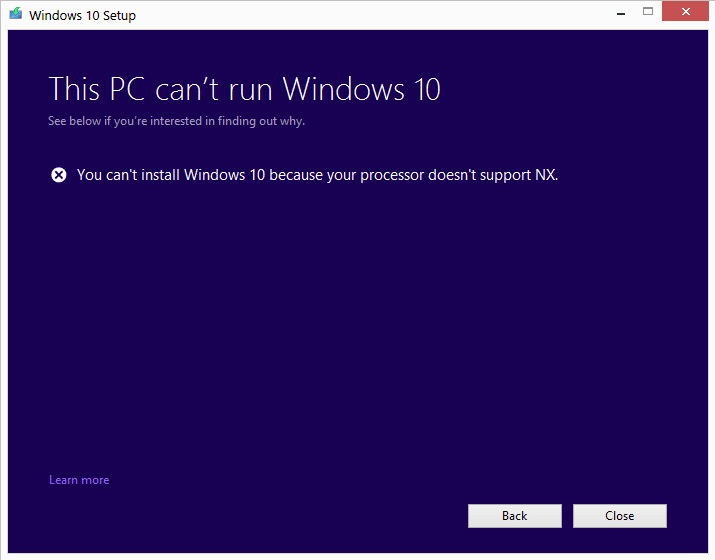
All in all, many issues could mess up Windows 10 installation but regarding “processor doesn’t support NX”, BIOS is the number one suspect. If the BIOS is out-of-date, various processes on Windows should go haywire and Windows upgrade is not an exception. Unless you take action, you would have a hard time upgrading the OS of your PC to Windows 10.
Actions To Take

Update BIOS
To update the BIOS, you need to get the utility designed by the manufacturer of your computer to update BIOS, firmware, drivers, etc.
For HP Computers
Download and install the latest version of HP Support Assistant . Look for the most recent version of BIOS available for your system then update the BIOS of your PC to that version.
For Dell Computers
Download and install the latest version of Dell Update Utility . After you finish, use the utility to update the BIOS of your PC.
For ASUS Computers
Download and install MyASUS BIOS update utility from ASUS’s official support site . You could then take advantage of the utility to update the BIOS of your PC.
For ACER Computers
Go to link , enter the Serial Number/SNID of your PC, select BIOS/Firmware and download the update.
For Lenovo Computers
Download and install Lenovo System Update Tool then use it to update the BIOS of your PC.
Install Windows 10 using Media Creation Tool
- Step 1: Launch your web browser then visit Microsoft’s official website.
- Step 2: Navigate to the Software Download page then download the Media Creation Tool for Windows 10.
- Step 3: As soon as the download concludes, you will be prompted to run the tool so hit Run.
- Step 4: Read the terms and conditions, check the checkbox next to I accept the license terms, and hit Next.
- Step 5: Select Upgrade this PC now then choose Next. Uncheck the checkbox beside Keep personal apps and files then hit Install. As soon as the installation wraps up, create a new user account and accept the terms. Last but not least, sign into your account.
Contact Customer Support
None of the above work? In that case, you have no choice but to get in touch with customer support for instructions. Depending on the situation, you should have your computer checked by a support expert.
Additional Questions About NX
What is NX on BIOS?
NX, also known as No eXecute, is a mode available on most devices nowadays. NX mode could be used to block the execution of specific types of codes to boost buffer overflow prevention. The BIOS of a number of systems contains an advanced option to enable or disable NX.
Should NX mode be enabled?
When NX is enabled, the CPU prohibits code from being executed in data-only memory pages. Thus, it is strongly recommended that you enable the NX unless you have other needs. It’s worth pointing out that No Execute (NX) is not supported by old AMD processors except the AMD64 processor series.
What is BIOS?
BIOS (Basic Input/Output System( one of the most key components that control the operation of Windows computers. It’s fine to think of BIOS as your computer’s first responder that activates the operating system and allows you to connect to all the functionalities. Needless to say, keeping BIOS up-to-date will go a long way toward improving the system’s responsiveness and fixing software faults.


As PCWorld’s senior editor, Mark focuses on Microsoft news and chip technology, among other beats. He has formerly written for PCMag, BYTE, Slashdot, eWEEK, and ReadWrite.