Маркировочный комплекс “из коробки” – Профессиональный
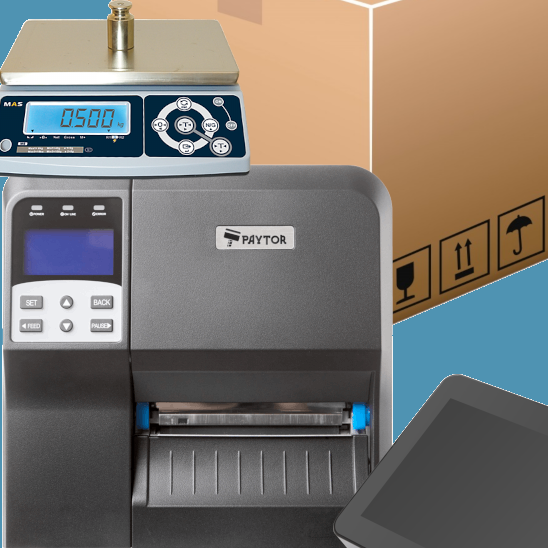
Готовое маркировочное решение “из коробки” для производителей мясной, рыбной и молочной продукции (Честный знак), а также полуфабрикатов с большим количеством печатаемых этикеток в смену. Подходит для поставщиков продукции в сетевые маркетплейсы.
Описание
Состав комплекса:
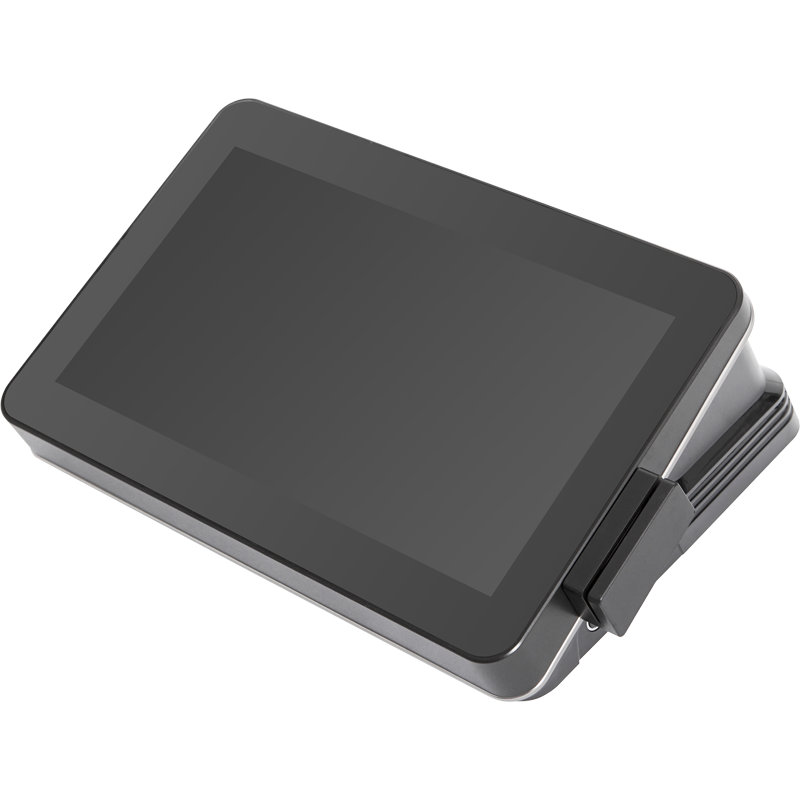
1. Сенсорный терминал PayTor Hammer
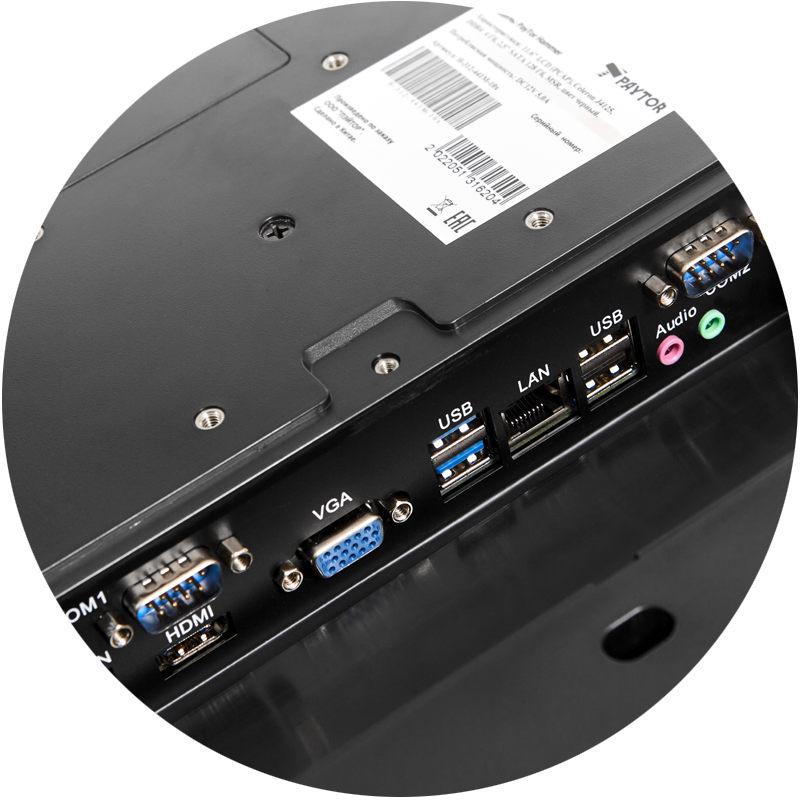
Celeron J4125, DDR4 4 Гб, 2,5″ SATA 128 Гб, Wi-Fi, MSR, Windows 10 IoT. Интерфесы: 3хUSB 2.0, 2хUSB3.0 (1хUSB 2.0 около кнопки включения, 2хUSB 2.0 и 2хUSB 3.0 на панели), внутренние 2 используются тач-скрином и магнитным считывателем), 2хCOM, 1хVGA, 1хEthernet, Аудио-выход, Динамик, DC in. Максимальное разрешение 1366×768. Рабочий диапазон температур о т 0 до +40°С. Сетевая карта Ethernet 10/100/1000 Мбит/с.
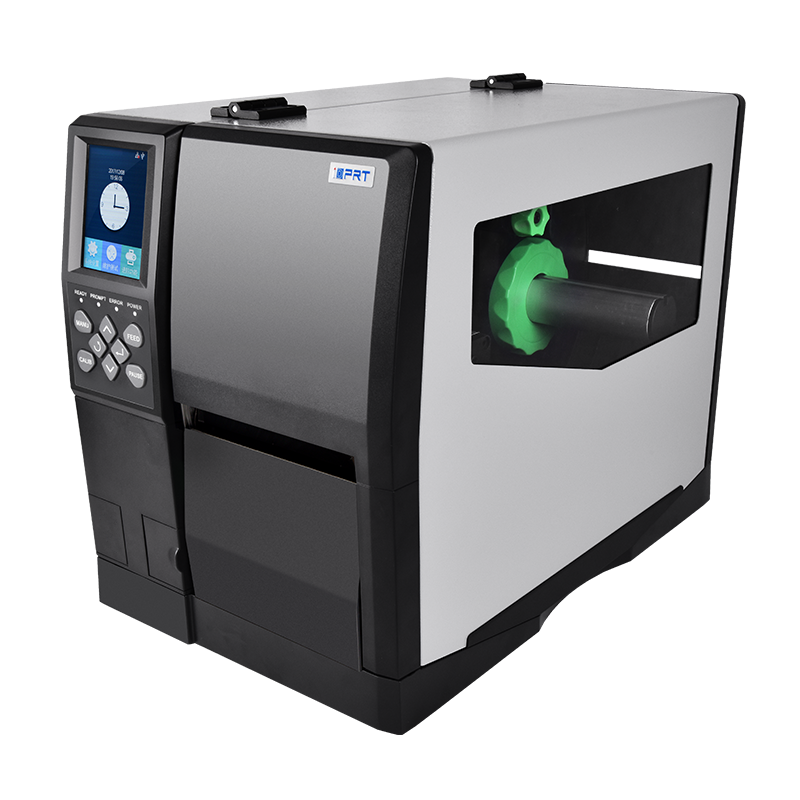
2. Принтер iDPRT iX4L 203dpi
Технические характеристики:
Скорость печати, мм/сек – 152
Питание – блок питания встроен в корпус
Максимальная ширина печати, мм – 104
Габариты, мм – 460.4 × 263.6 × 330.5
Гарантия – 1 год
Ресурс печатающий головки, км – 50
Датчики – Детекция отключения печатающего механизма и конца риббона. Детекция конца материала, детекция перегрева печатюащей головки, Датчик на просвет и на отражение, датчик перегрева привода
Класс принтера – Промышленный
Объем оперативной памяти – 32 Мб
Максимальная длина печати, мм – 1000
Толщина этикетки, мм – 0.08-0.25
Ширина материала, мм – 25-120
Типы печатаемых штрих-кодов – 1D: Code 39, Code 93, EAN 8/13 (add on 2 & 5),UPC A/E (add on 2 & 5), I 2 of 5 & I 2 of 5 with Shipping Bearer Bars, Codabar, Code128 (subset A, B, C), EAN 128, RPS 128, UCC 128,UCC/EAN-128 K-Mart, Random Weight,Post NET,ITF 14,China Postal Code,HIBC,MSI,Plessey, Telepen, FIM, GS1 DataBar, German Post Code, Planet 11 & 13 digit, Japanese Postnet, I 2 of 5 with human readable check digit, Standard 2 of 5, Industrial 2 of 5, Logmars, Code 11, Code 49, Cadablock2D: PDF417,Data matrix code,Maxi Code, QR code,Micro PDF417,Micro QR code, Aztec code
Язык программирования – EPL,DPL,ZPL,ZPL-II,TSPL
3,5″ TFT ЖК-дисплей.
Разрешение печати – 203 dpi.
Максимальная скорость печати – 152 мм/сек.
Объем накопительной памяти – 128MB.
Материал для печати – сплошная бумага, зазор, черная метка,этикетка с перфорированным отверстием, ЭКО-Термо, этикетки,полуглянцевая художественная этикетка с покрытием.
Рабочий диапазон температур – От 0 до +50°С
Интерфейс – USB Type Bх1 /USB HOSTх1 /RJ45х1 /RS232(9-pin) х1
Цвет – Черный
Метод печати – Термотрансферная
Втулка риббона, мм – 25.4
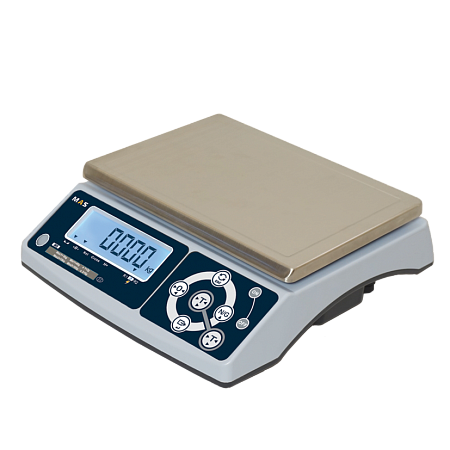
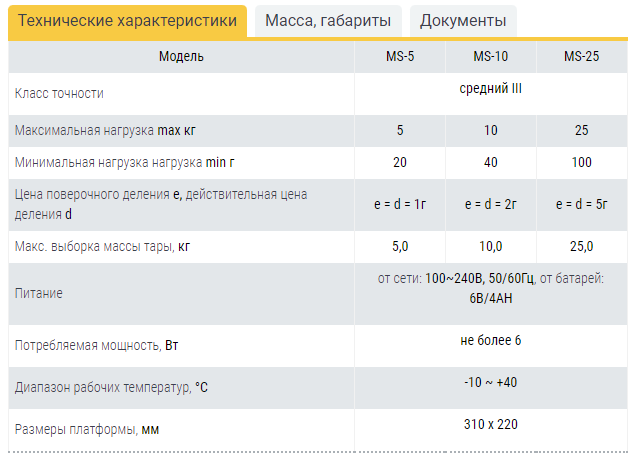
3. Порционные (фасовочные) весы Серия MASter MS
- Высокая скорость взвешивания
- Продолжительность работы от аккумулятора до 120 часов
- Жидкокристаллический дисплей с размером символов 30 мм
- Светодиодная подсветка дисплея с автоматическим уменьшением яркости
- Платформа из нержавеющей стали
- Интерфейс RS-232
- Мембранная влагостойкая клавиатура
- Счетный режим
- Функция дозирования (Hi-Ok-Lo)
- Функция чистый /полный вес (Net/Gross)
- Автоматическая установка нуля при включении
- Вычитание массы тары до 100% от максимальной нагрузки
4. Лицензия программного обеспечения “SimplePacking” (включена подписка на 3 месяца)
“SimplePacking” – аналог импортного ПО “Bartender”, но с более обширным функционалом. Есть редактор макетов этикеток с иерархичным построением (порция, ящик, паллет), редактор справочников (номенклатура, операторы, типы номенклатуры, тара), импорт/экспорт справочников, настраиваемый журнал маркировки, динамические данные, которые могут вводится оператором в процессе маркировки (дата, номер смены, партии и т.п.). Позволяет создавать и печатать итоговый штрих-код GS1 DataBar ES и EAN128 для системы “Меркурий”. Организована работа с системой “Честный знак”: заказ кодов на эмиссию, печать кодов, формирования отчетов о нанесении и выбытии. И многое другое. Подробнее в наших видео.
Похожие товары
Маркировочный комплекс “из коробки” – Оптимальный
Подписка на новости
Подпишитесь на полезные рассылки и новости маркировки товаров
+7 (495) 131-62-64 +7 (495) 401-68-49 sale@llc-bs.ru 109548, Россия, г. Москва, улица Шоссейная, дом 1, корп. 1, кабинет 29
Навигация
- Главная
- О нас
- Интеллектуальный маркировочный комплекс “Весы-Принтер”
- ПРАКТИК-ЗАКАЗ (версия 2.0)
- Практика заказ + 1С
- Автоматизация маркировки с «Практик-Заказ»
- Какие товары подлежат маркировке в системе «Честный знак»
- Приложение «Честный знак» – зачем нужно и как им пользоваться
- Как зарегистрироваться в Честном знаке – пошаговое руководство
- Маркировка пива
- Маркировка сыра
- Маркировка сметаны
- Маркировка сливочного масла
- Маркировка творога
- Маркировка табака «Честный знак»
- Маркировка молока
- «Пластик – Учет»
- Автоматизация учета с “Пластик-Учет”
- Автоматизация производства с «Пластик-Учет»
- Маркировка по отраслям
- Маркировка мяса
- Маркировка рыбы
- Маркировка сыра
- Маркировка шуб
- Маркировка ветеринарных препаратов
- Маркировка шин
- Маркировка обуви
- Маркировка кресел-колясок
- Маркировка велосипедов
- SimplePacking Printer/Desktop
- Практик-Заказ
- Пост весового контроля автомобильного транспорта
- Краткие видеоинструкции по работе с ПАК ″Весы-Принтер″
- Демонстрации
- SimplePacking Printer/Desktop
- Внедрения
- ПАК Пластик-Учет
Работаем по всей России
Филиал в Казахстане
просп. Мангилик Ел, 53блокС, Нур-Султан (Астана), Казахстан
+7 (495) 131-62-64
sale@llc-bs.kzCHK issues — WHERE is this number?!
This is highly annoying. I cannot register my product and thereby kick in the warranty (which I purchased an additional 2 years of) because I can’t find the «CHK» number by the serial number. I have an «MNK» number but it will not accept that. Surely I’m not the only one who’s run into this issue? I took the side panel off my MSI Aegis 10th (desktop gaming PC) and there’s a CHK by the serial number on the GTX graphics card, but of course it didn’t take that one either. I would appreciate some direction or assistance on this.
ransteven15d602e1
New member
Joined Sep 1, 2020 Messages 2
I just purchased an MSI Aegis SE10SI-001US and I have the same issue! Also, I have some sort of S/N on the outside of the case but that doesn’t match anything on the box. It’s pretty frustrating!
ransteven15d602e1
New member
Joined Sep 1, 2020 Messages 2
Just called support and found out that the numbers are on the bottom of the case. Had to power it down and turn it up and take a pic of it. It has the S/N AND the CHK number there. It worked fine to register. Hope this helps someone else.
herbxfedxlio150702d9
Stoned Thinker
Joined Sep 15, 2020 Messages 18
This is highly annoying. I cannot register my product and thereby kick in the warranty (which I purchased an additional 2 years of) because I can’t find the «CHK» number by the serial number. I have an «MNK» number but it will not accept that. Surely I’m not the only one who’s run into this issue? I took the side panel off my MSI Aegis 10th (desktop gaming PC) and there’s a CHK by the serial number on the GTX graphics card, but of course it didn’t take that one either. I would appreciate some direction or assistance on this.
If you take a look at the barcode sticker on the 24-pin power connector on the motherboard side. there should be a CHK number there.
mr080820114f502ce
New member
Joined Oct 4, 2020 Messages 1
It’s frustrating how I bought my CPU prebuilt cause I know nothing about PC building. Too scared to take it apart. Looks like I’m gonna hire a technician just to take this thing apart. Extremely inconvenient.
herbxfedxlio150702d9
Stoned Thinker
Joined Sep 15, 2020 Messages 18
It’s frustrating how I bought my CPU prebuilt cause I know nothing about PC building. Too scared to take it apart. Looks like I’m gonna hire a technician just to take this thing apart. Extremely inconvenient.
Don’t feel defeated. Just do some research on other people taking pc’s apart.
badboy2k
Well-known member
Global Moderator
Joined Feb 11, 2012 Messages 13,666if its a Pre Built PC its usually on the bottom
if its a motherboard its on the side of the 24pin Power Connector
if its a graphics card its usually on the serial number that is just above the x16 PCI-E connectionkeithkellenberge14f702d0
New member
Joined Oct 9, 2020 Messages 3
This is highly annoying. I cannot register my product and thereby kick in the warranty (which I purchased an additional 2 years of) because I can’t find the «CHK» number by the serial number. I have an «MNK» number but it will not accept that. Surely I’m not the only one who’s run into this issue? I took the side panel off my MSI Aegis 10th (desktop gaming PC) and there’s a CHK by the serial number on the GTX graphics card, but of course it didn’t take that one either. I would appreciate some direction or assistance on this.
the chk number was on the 24 pin atx socket on my mobo
pereranavishka
Member
SERGEANT
Joined Jun 12, 2017 Messages 94You can find both 2 S/N through your MSI products. The package box will commonly show the S/N 1 number. But you can find 2nd S/N 2 as a sticker on your product. And also you may have to show your invoice of purchase of your MSI product registration.
bifrilu152a02de
New member
Joined Nov 10, 2020 Messages 1
I have installed my 3080 Ventus card and do not have access to see the CHK code. So when one can’t use the MHK code on the box to register my product. Then MSI can’t care if users register. I’m not going to disassemble my pc to find this number.
Alan J T
Demon God Gone Racing Forza MS Is live
Global Moderator
Joined Sep 11, 2020 Messages 15,531I have installed my 3080 Ventus card and do not have access to see the CHK code. So when one can’t use the MHK code on the box to register my product. Then MSI can’t care if users register. I’m not going to disassemble my pc to find this number.
Try to register it via dragon center that can read the numbers for you was how I registered my Motherboard.
pereranavishka
Member
SERGEANT
Joined Jun 12, 2017 Messages 94
To register the product on MSI reward program, you should have S/N numbers with your product.gscarreon_0156502db
New member
Joined Nov 18, 2020 Messages 2
This is highly annoying. I cannot register my product and thereby kick in the warranty (which I purchased an additional 2 years of) because I can’t find the «CHK» number by the serial number. I have an «MNK» number but it will not accept that. Surely I’m not the only one who’s run into this issue? I took the side panel off my MSI Aegis 10th (desktop gaming PC) and there’s a CHK by the serial number on the GTX graphics card, but of course it didn’t take that one either. I would appreciate some direction or assistance on this.
Hi Tommy you can find the CHK underneath your Desktop Computer. I hope this help.
gscarreon_0156502db
New member
Joined Nov 18, 2020 Messages 2
I just purchased an MSI Aegis SE10SI-001US and I have the same issue! Also, I have some sort of S/N on the outside of the case but that doesn’t match anything on the box. It’s pretty frustrating!
Hi Sir, you can find the CHK underneath your Desktop Computer(bottom plate). I hope this help.
calvi15ac02e7
New member
Joined Nov 27, 2020 Messages 1
I have the same issue, I bought a prebuild MSI PC (Codex R 10SC-004CA), and there is no CHK on the bottom of the unit nor on the box. only MNK. help?
pavel_koza1220029d
New member
Joined Jan 7, 2021 Messages 1
I will bring my comp for cleaning on St. Catherine, 2021. The very date, I will turn it and I will be able — as I hope — to tell you what is my CHK.
michaelvan159402e3
New member
Joined Mar 27, 2021 Messages 1
Where is the CHK number. I bought an MSI MAG321CURV monitor and cannot see anything like another number on the product serial number sticker, which for some reason is on the bottom of the monitor! I must be missing the obvious, please help.
davidhbrown
New member
PRIVATE E-2
Joined Mar 22, 2019 Messages 6On my video card, it was fortunately near the top edge of the PCB backplane with the LEDs, not near the PCI connector or buried under fans or blocked by the support arm. Still very hard to see as my CPU cooler is pretty big so I had to read at a nearly flat angle with the LEDs in my eyes. [Waah, waah ]
The MSI Center (rebranded Dragon Center) refused to register it for me. Had to restart it even to show a dropdown list of countries for place of purchase.
Wish they’d warn you about this CHK thing with a sticker on the bag with a place to write it down or something like that so you can take care of it before installation.
Chk код msi где найти на коробке
Вы попали на эту страницу, так как запрошенный сайт не был найден на сервере. Это возможно по разным причинам:
- Сайт был отключен за неуплату. Как только владелец пополнит счёт и включит сайт — всё заработает!
- Сайт переезжает на другой сервер, а записи в DNS еще не обновились. Нужно немного подождать.
- Сайт был заброшен и удалён, а записи в DNS, ведущие на наш хостинг, еще остались.
- Неверный запрос. Такого сайта у нас нет, вы пришли сюда по ошибке.
Если вы владелец отключенного сайта, то для возобновления его работы вам нужно перейти в панель управления, пополнить счет и запустить свой сайт.
Что будет, если вы не успеете оплатить хостинг?
Сервис ждет 10 дней (для платных тарифов) и только потом удаляет сайт с сервера. Бэкапы хранятся еще 20 дней. Вы можете обратиться в тех. поддержку и в течение этого времени и мы восстановим сайт из резервной копии.
Chk код msi где найти на коробке
Вы попали на эту страницу, так как запрошенный сайт не был найден на сервере. Это возможно по разным причинам:
- Сайт был отключен за неуплату. Как только владелец пополнит счёт и включит сайт — всё заработает!
- Сайт переезжает на другой сервер, а записи в DNS еще не обновились. Нужно немного подождать.
- Сайт был заброшен и удалён, а записи в DNS, ведущие на наш хостинг, еще остались.
- Неверный запрос. Такого сайта у нас нет, вы пришли сюда по ошибке.
Если вы владелец отключенного сайта, то для возобновления его работы вам нужно перейти в панель управления, пополнить счет и запустить свой сайт.
Что будет, если вы не успеете оплатить хостинг?
Сервис ждет 10 дней (для платных тарифов) и только потом удаляет сайт с сервера. Бэкапы хранятся еще 20 дней. Вы можете обратиться в тех. поддержку и в течение этого времени и мы восстановим сайт из резервной копии.