W32.AIDetectVM.malware — что это за вирус?

Приветствуют. При определении угроз антивирусы и сервисы часто пишут непонятные название. Попробуем расшифровать одно из таких.
PS: VirusTotal — известный популярный сервис, где можно проверить любой файл на наличие вирусов. Для проверки будут использованы десятки антивирусных движков (в том числе малоизвестных).
W32.AIDetectVM.malware — что это такое?
Угроза, которая может быть найдена антивирусом Bkav в проверяемом файле на VirusTotal.

W32 скорее всего означает что приложение 32-битное, а malware означает просто вредоносная программа. AIDetectVM — непонятно.
Угроза может быть:
- Трояном. Вирус, который прописывается в автозагрузку, после запуска ожидает команды от хакера. В основном используется для пересылки паролей/логинов/ценной информации.
- Ботнетом. Похож на троян, однако создан специально чтобы работать в больших сетях. Ботнеты в основном созданы чтобы использовать ресурсы ПК, например для подбора пароля/логина/организации DDoS-атак. Сеть ботнетов управляется из командного центра. Ботнет от слова бот, которых может быть тысячи и даже десятки тысяч по всему миру и все обьедены в одну управляемую сеть.
- Майнером. Вирус который не крадет пароли (хотя потенциально такая функция может быть), а задача — использовать ваш ПК для добычи криптовалюты. Особенно используется видеокарта. На практике симптом один и самый главный — какой-то процесс грузит ПК, может полностью или строго например на 50%.
W32.AIDetectVM.malware может обнаруживаться в любом софте/файле. Читал сообщения, что находили в установщиках игр и даже в ПО Java, скачанном с офф сайта.
Пишут что антивирусный движок Bkav во многих нормальных программах находит угрозу W32.AIDetectVM.malware. Другими словами — ложная тревога.
Bkav — вьетнамский антивирус, в 2011 году по мнению агенства Virus Bulletin был признан лучшим. Другое название — Bkis. Родина — Вьетнам. Включает в себя умное сканирование, брандмауэр, антишпион. Читаю что раньше — антивирус удалял файл .docx, считая опасным, чистил мусор в системе, при этом пропускал серьезные вирусы, которые с легкостью обнаруживались другими антивирусами.

Bkav возможно и неплохой. Однако о нем мало слышно на рынке СНГ в отличии от Avast, Kaspersky, NOD32.
Заключение
- W32.AIDetectVM.malware — тип угрозы, который часто находит антивирус Bkav при проверке файла на VirusTotal.
- Часто это именно ложное срабатывание, тем более что угрозу находит только Bkav.
W32.AIDetect.malware2 что это такое?
Угроза, которая может быть найдена антивирусом Bkav в проверяемом файле на VirusTotal.
W32 скорее всего означает что приложение 32-битное, а malware означает просто вредоносная программа. AIDetectVM — непонятно.
Угроза может быть:
Трояном. Вирус, который прописывается в автозагрузку, после запуска ожидает команды от хакера. В основном используется для пересылки паролей/логинов/ценной информации.
Ботнетом. Похож на троян, однако создан специально чтобы работать в больших сетях. Ботнеты в основном созданы чтобы использовать ресурсы ПК, например для подбора пароля/логина/организации DDoS-атак. Сеть ботнетов управляется из командного центра. Ботнет от слова бот, которых может быть тысячи и даже десятки тысяч по всему миру и все обьедены в одну управляемую сеть.
Майнером. Вирус который не крадет пароли (хотя потенциально такая функция может быть), а задача — использовать ваш ПК для добычи криптовалюты. Особенно используется видеокарта. На практике симптом один и самый главный — какой-то процесс грузит ПК, может полностью или строго например на 50%.
W32.AIDetectVM.malware может обнаруживаться в любом софте/файле. Читал сообщения, что находили в установщиках игр и даже в ПО Java, скачанном с офф сайта.
Пишут что антивирусный движок Bkav во многих нормальных программах находит угрозу W32.AIDetectVM.malware. Другими словами — ложная тревога.
Bkav — вьетнамский антивирус, в 2011 году по мнению агенства Virus Bulletin был признан лучшим. Другое название — Bkis. Родина — Вьетнам. Включает в себя умное сканирование, брандмауэр, антишпион. Читаю что раньше — антивирус удалял файл .docx, считая опасным, чистил мусор в системе, при этом пропускал серьезные вирусы, которые с легкостью обнаруживались другими антивирусами.
W32/PossibleThreat
W32/PossibleThreat is classified as a file infector.
A file infector is a type of malware that has the capability to propagate by attaching its code to other programs or files.
The Fortinet Antivirus Analyst Team is constantly updating our descriptions. Please check the FortiGuard Encyclopedia regularly for updates.
Recommended Action
- Make sure that your FortiGate/FortiClient system is using the latest AV database.
- Quarantine/delete files that are detected and replace infected files with clean backup copies.
Telemetry
Detection Availability
| FortiGate |
|---|
| Extended |
| FortiClient |
| Extreme |
| FortiAPS |
| FortiAPU |
| FortiMail |
| Extreme |
| FortiSandbox |
| Extreme |
| FortiWeb |
| Extreme |
| Web Application Firewall |
| Extreme |
| FortiIsolator |
| Extreme |
| FortiDeceptor |
| Extreme |
| FortiEDR |
| ID | 7800026 |
| Released | May 09, 2018 |
| Description Updated |
May 09, 2018 |
| Platform Profile | Win32 file format / PE 32 bit |
W32.AIDetect.malware2 Trojan
*7-day Free Trial w/Credit card, no charge upfront or if you cancel up to 2 days before expiration; Subscription price varies per region w/ auto renewal unless you timely cancel; notification before you are billed; 30-day money-back guarantee; Read full terms and more information about free remover.
W32.AIDetect.malware2
W32.AIDetect.malware2 is a dangerous Trojan horse infection that can be extremely difficult to detect and even more difficult to remove. Unlike other viruses, W32.AIDetect.malware2 does not show any visible symptoms while in the operating system.
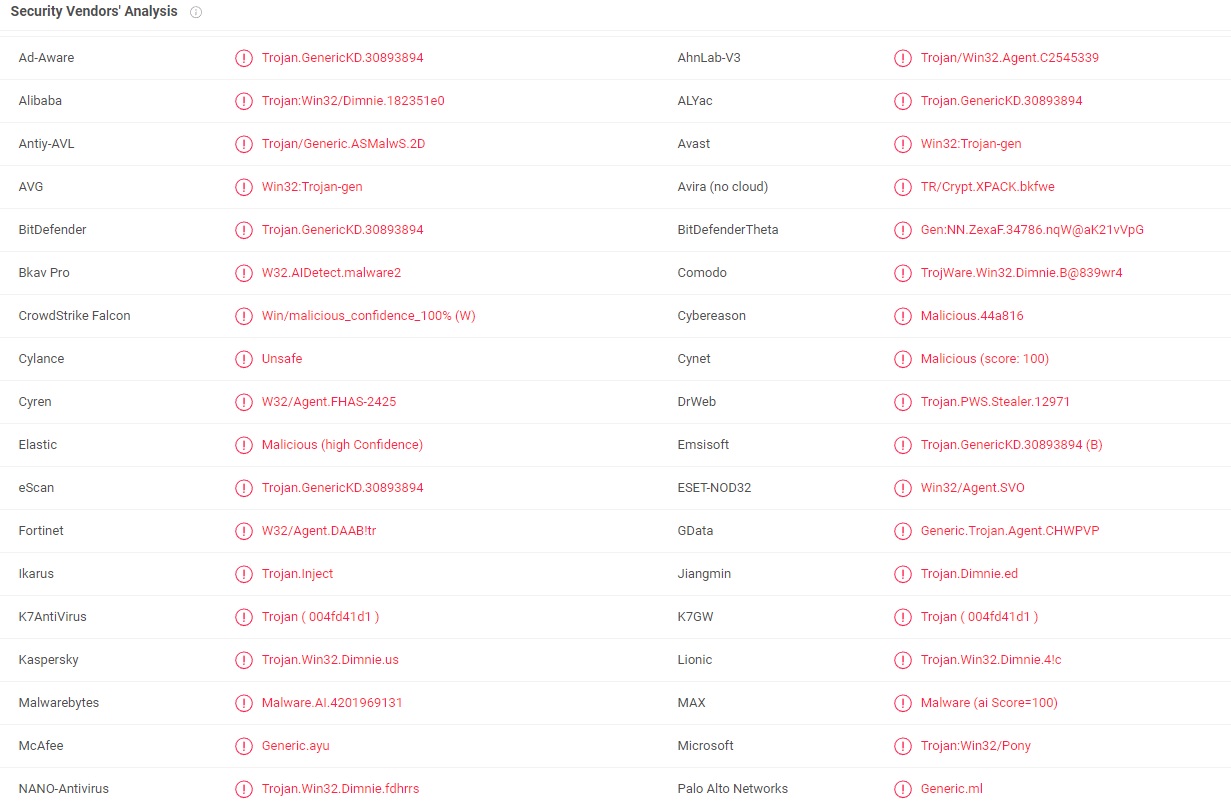
This means W32.AIDetect.malware2 can work in complete stealth for an indefinite period of time or until it causes some major system damage or until it completes whatever it’s task might have been. What is more, W32.AIDetect.malware2 (or viruses like Altruistics, Energy.exe) like most Trojan-based infections may mimic legitimate system processes that are already running and, in this way, avoids being detected. Once inside the system, such a threat can be used for a long list of malicious activities. The hackers behind it can use the Trojan to weaken the security of your system and to secretly infect the computer with other malware such as ransomware or spyware. They may also use the infection to steal sensitive information such as passwords, login credentials and banking details, which can later be used for theft, fraud, blackmailing, different scams and more. W32.AIDetect.malware2 may also provide its creators with remote access and allow them to exploit the system’s resources for their criminal activities.
Typically, during the time it operates, it is almost impossible to notice the presence of the Trojan in the system. Yet, sometimes, you may notice that your computer is running slower than usual, programs take longer to open when you try to run them, some parts of legitimate web pages are unavailable and your CPU and RAM usage is higher than usual without any apparent reason.
These may not always be indicators for a possible Trojan horse infection but if you are already bothered by such problems, it is a good idea to conduct a full system scan with reliable antivirus software and remove any suspicious files and components that might be triggering such symptoms. If you use a powerful anti-malware program that has been updated, you should not have any problems removing even W32.AIDetect.malware2 in case you detect it.
How do Trojans infect computers?
According to various computer security specialists, the Trojans spread primarily with the help of malicious email attachments, spam messages, cracked software and fake ads. W32.AIDetect.malware2, in particular, can be accidentally downloaded from illegal webpages that are commonly used to distribute freeware and pirated content. Also, this cyber infection may try to infiltrate your computer through misleading notifications, too-good-to-be-true offers and other similar distribution methods.
That’s why we advise you to avoid emails that tell you of unexpected rewards and profits and ask you to click or download different files and components. Always avoid ads that offer you to upgrade your Flash Player, FLV Player and other similar programs – updates should only be downloaded from the official web pages of the programs. And finally, to be safe and keep your computer protected, it’s a good idea to have professional security software installed on your computer and to update it regularly. This will help you avoid any potential security breaches and will help you prevent future infections with such (or other) malware.
If you need to remove W32.AIDetect.malware2 from your system, we suggest you carefully read the instructions in the removal guide we offer. Be very careful while following the manual steps because, as we said above, the Trojan may mimic important system processes and files which, if stopped or deleted, may cause instability and serious system issues. To avoid additional damage to the system, better use the suggested online scanners and the linked anti-malware tool and in combination with the manual removal steps.
SUMMARY:
Remove W32.AIDetect.malware2 Trojan
If you have a Windows virus, continue with the guide below.
If you have a Mac virus, please use our How to remove Ads on Mac guide.
If you have an Android virus, please use our Android Malware Removal guide.
If you have an iPhone virus, please use our iPhone Virus Removal guide

Some of the steps will likely require you to exit the page. Bookmark it for later reference.
Reboot in Safe Mode ( use this guide if you don’t know how to do it) .

WARNING! READ CAREFULLY BEFORE PROCEEDING!

We get asked this a lot, so we are putting it here: Removing a malware manually may take hours and damage your system in the process. We recommend downloading SpyHunter to see if it can detect the malware for you.
Press CTRL + SHIFT + ESC at the same time and g o to the Processes Tab . Try to determine which processes are dangerous.
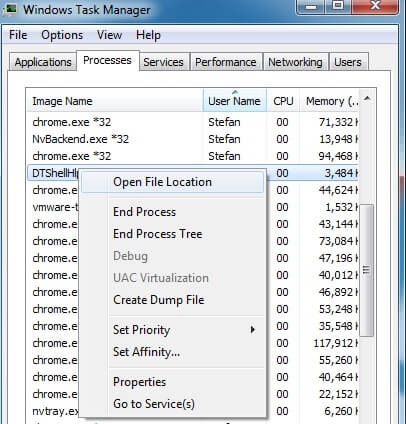
Right click on each of them and select Open File Location. Then scan the files with our free online virus scanner:
Each file will be scanned with up to 64 antivirus programs to ensure maximum accuracy
This scanner is free and will always remain free for our website’s users.
This file is not matched with any known malware in the database. You can either do a full real-time scan of the file or skip it to upload a new file. Doing a full scan with 64 antivirus programs can take up to 3-4 minutes per file.
Drag and Drop File Here To Scan
Upload File

Analyzing 0 s
Each file will be scanned with up to 64 antivirus programs to ensure maximum accuracy
This scanner is based on VirusTotal’s API. By submitting data to it, you agree to their Terms of Service and Privacy Policy, and to the sharing of your sample submission with the security community. Please do not submit files with personal information if you do not want them to be shared.
A fter you open their folder, end the processes that are infected, then delete their folders.
Note: If you are sure something is part of the infection – delete it, even if the scanner doesn’t flag it. No anti-virus program can detect all infections.
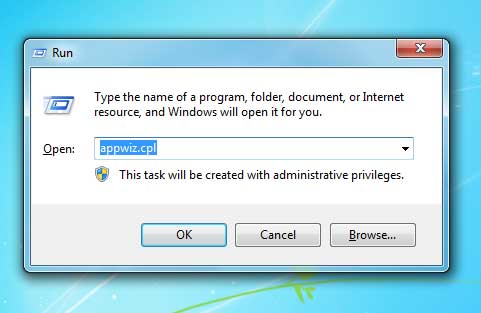
Hold together the Start Key and R . Type appwiz.cpl –> OK.
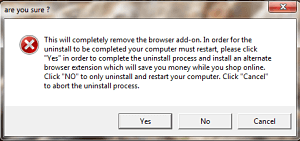
You are now in the Control Panel . Look for suspicious entries. Uninstall it/them . If you see a screen like this when you click Uninstall , choose NO:
Type msconfig in the search field and hit enter. A window will pop-up:
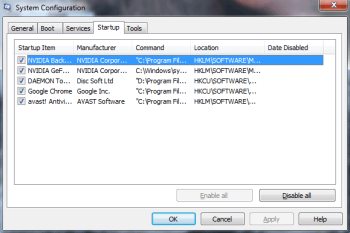
Startup —> Uncheck entries that have “Unknown” as Manufacturer or otherwise look suspicious.
- Remember this step – if you have reason to believe a bigger threat (like ransomware) is on your PC, check everything here.
Hold the Start Key and R – copy + paste the following and click OK:
notepad %windir%/system32/Drivers/etc/hosts
A new file will open. If you are hacked, there will be a bunch of other IPs connected to you at the bottom. Look at the image below:
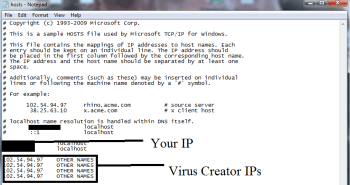
If there are suspicious IPs below “Localhost” – write to us in the comments.
Type Regedit in the windows search field and press Enter.
Once inside, press CTRL and F together and type the virus’s Name. Right click and delete any entries you find with a similar name. If they don’t show up this way, go manually to these directories and delete/uninstall them:
- HKEY_CURRENT_USER—-Software—–Random Directory. It could be any one of them – ask us if you can’t discern which ones are malicious.
HKEY_CURRENT_USER—-Software—Microsoft—-Windows—CurrentVersion—Run– Random
HKEY_CURRENT_USER—-Software—Microsoft—Internet Explorer—-Main—- Random
If the guide doesn’t help, download the anti-virus program we recommended or try our free online virus scanner. Also, you can always ask us in the comments for help!

About the author
Violet George
Violet is an active writer with a passion for all things cyber security. She enjoys helping victims of computer virus infections remove them and successfully deal with the aftermath of the attacks. But most importantly, Violet makes it her priority to spend time educating people on privacy issues and maintaining the safety of their computers. It is her firm belief that by spreading this information, she can empower web users to effectively protect their personal data and their devices from hackers and cybercriminals.