Сокет LGA1700, охлаждение.
Собрался обновлять комп, остановился на интелах 12-го поколения, i7 или i9. Но они очень горячие, нужна хорошая система охлаждения.
И вот засада, не могу найти кулеров под этот сокет. Есть такие:
https://fk.by/computer-parts/coolers?filter_ocfilter=30028:314745006
Но что-то у меня сомнения, что они вытянут 200+ Вт.
Кто-нибудь уже пользуется? Какой кулер взяли? Есть ли водянка под них?
#1
22:12, 2 янв 2022
Scarabus
> https://fk.by/computer-parts/coolers?filter_ocfilter=30028:314745006
> Но что-то у меня сомнения, что они вытянут 200+ Вт.
Первый — 59Вт, второй 140Вт
#2
22:19, 2 янв 2022
Нужно что-то типа
#3
22:25, 2 янв 2022
Расчетная тепловая мощность (TDP) 190 Вт
Расчетная тепловая мощность (TDP) 241 Вт
> Нужно что-то типа
О, монтажные комплекты начали выпускать. Я читаю статьи про охлаждение на этом сокете и что-то волосы шевелятся. Буду разбираться.
#4
22:29, 2 янв 2022
Scarabus
> Ошибка?
Я про кулеры Noctua
#5
22:43, 2 янв 2022
0iStalker
> Я про кулеры Noctua
А, понятно. Да, по ним и так видно, что не потянут.
#6
23:07, 2 янв 2022
Scarabus
> 12700k
> Расчетная тепловая мощность (TDP) 190 Вт
а 317W — не хочешь ? 😀
3dnews -> Обзор Core i7-12700K -> Энергопотребление
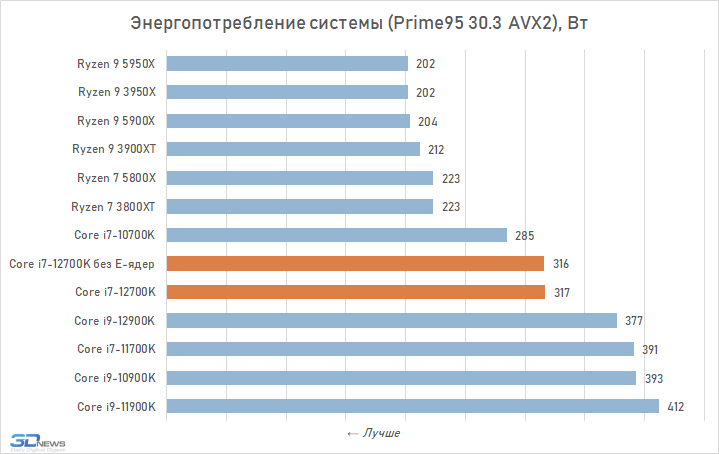
бери лучше 5900X — за 47 тыр (если 5600X для твоих задач — не подходит), или жди Zen3+ (с 3D V-cache), или вообще Zen 4 ..
имхо, интеловские качегарки — хороши только для процов уровня 12400F (ну или 12100F), а остальным только мат платы плавить .. 😀
#7
23:42, 2 янв 2022
Scarabus
TDP k серии на Z чипсете зависит от настроек биоса материнской платы, авторазгон и вот это вот всё.
#8
23:47, 2 янв 2022
xma
> а 317W — не хочешь ? 😀
Ты реально не видишь что там написано?
#9
23:50, 2 янв 2022
Энергопотребление != тепловыдению (и в целом, в системе есть ещё чему потреблять, кроме процессора)
#10
23:54, 2 янв 2022
^ я шучу если что, найди рандомную башню на 200Вт, будет тротлить в тестах — сделай андервольт и на пару сотен мегагерц снизь частоту и он у тебя будет холодный с потерей 2-4% производительности
#11
3:46, 3 янв 2022
xma
Мне пофиг на энергопотребление, я же не ферму собираю)
Во всех кулерах меня парит то, что у большинства крепления для 1700 были добавлены только в Q4 2021. Вот и попробуй угадай, что покупаешь. Плюс мне надо, чтобы это было доступно в РБ.
Уже подумываю взять на поколение ниже. Вроде разница в производительности небольшая, зато шанс получить гемороя гораздо меньше. Единственное — с DDR5 в пролете. А хочется именно ее.
#12
4:05, 3 янв 2022
Может действительно лучше Ryzen 9 5900X или 5950X взять?
#13
9:56, 3 янв 2022
0iStalker
> Энергопотребление != тепловыдению (и в целом, в системе есть ещё чему
> потреблять, кроме процессора)
А куда ещё там может уходить энергия? В магнитное поле? Наверное, это маленький процент.
#14
10:01, 3 янв 2022
Scarabus
да возьми ты дипкул люцифер и не мучайся. Погугли чем отличается 1700 от 1200, у люцифера кулер вроде бы колхозно встает даже без доработки крепления,
и на сайте дипкула у него появилась совместимость с 1700.
он же gamerstorm lucifer, он же deepcool red hat, ему правда корпус нужен широкий, но это так, должен влезть, если не совсем говно корпус
Scarabus
> Может действительно лучше Ryzen 9 5900X или 5950X взять?
нет не лучше.
PANDA
> А куда ещё там может уходить энергия? В магнитное поле? Наверное, это маленький
> процент.
Тут плюсую, но там все же энергопотребление системы, если они его по розетке меряют, там минимум +6% с БП и
+еще минимум столько же с оперативки, ЖД, затычки в видеослоте и т.д.
Что такое CPU Load-Line Calibration в BIOS
В процессе выполнения разгона по мере увеличения нагрузки часто встречается такое явление, как падение напряжения, подаваемого на процессор. Слишком низкое напряжение делает систему нестабильной. Иногда появляются даже «синие экраны смерти». Эту проблему частично можно решить, установив напряжение для процессора с запасом для того, чтобы во время нагрузки оно не падало ниже определённого значения.
Однако, у этого метода есть существенные минусы: повышенное тепловыделение и ускоренная деградация процессора из-за высоких температур и напряжения. Для борьбы с падениями напряжения была разработана технология, названная LLC (Load-Line Calibration). О ней и пойдёт речь в этой статье.
Что такое CPU Load-Line Calibration в BIOS?
Технология LLC доступна в программных интерфейсах большинства материнских плат. В данный момент уже многие крупные производители материнских плат — ASUS, GIGABYTE, ASRock, MSI и др. — реализовали в своей продукции эту технологию.
LLC используется для борьбы с падениями напряжения. Работает следующим образом: как только напряжение, подаваемое на процессор, начинает снижаться при нагрузке, LLC динамически поднимает базовое напряжение, тем самым компенсируя его падение. Чем ниже опускается фактическое напряжение, тем выше LLC поднимает базовое.
На графике ниже показана разница величин напряжения при условии задействования LLC уровня 1 (0%) и уровня 5 (100%). По вертикали — напряжение, по горизонтали — нагрузка на процессор.
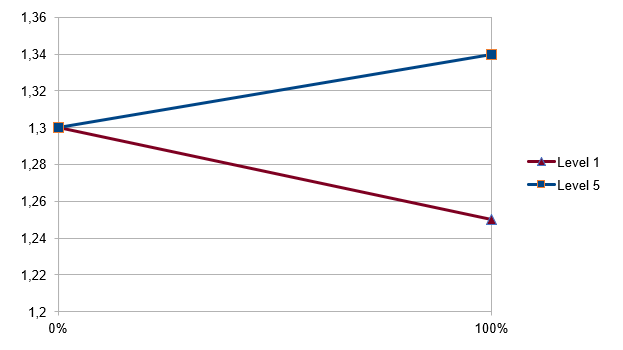
Как видно из графика, при отключённой LLC напряжение неуклонно падает. Для уровня 5 видим обратную картину: напряжение завышено, что тоже не очень хорошо. Немного поразмыслив, понимаем, что нужно поискать оптимальное значение. Об этом будет сказано в разделе о настройке параметра.
Такой подход позволяет выровнять уровень напряжения, подаваемого на процессор, и сделать работу компьютера стабильной. Далее переходим к установке параметра CPU Load-Line Calibration в биосе.
Настройка параметра CPU Load-Line Calibration
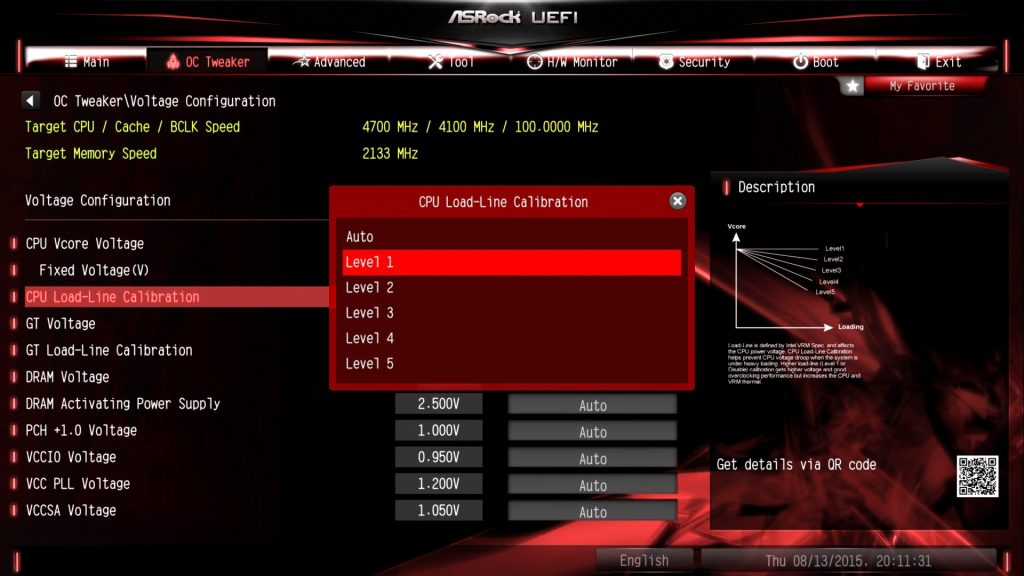
До искомого параметра CPU Load-Line Calibration в настройках BIOS можно добраться, следуя по по пути (для материнских плат ASRock): OC Tweaker → Voltage Configuration → CPU Load-Line Calibration. Выбор этого пункта приводит к загрузке контекстного меню, в котором, в свою очередь, можно выбрать одно из 6-ти значений: Level 1-5 и Auto.
На скриншотах ниже для наглядности показана зависимость напряжения (по вертикали) от выбранного уровня LLC и уровня нагрузки на процессор (по горизонтали). Для проведения тестирования использовались режимы Level 1 и Level 3. В данном конкретном случае проводилось тестирование процессора AMD Ryzen 5 2600X с помощью бенчмарка Cinebench R20. Для проведения мониторинга показаний и вывода графиков использовалась утилита HWiNFO64. Для режима Level 1 имеем следующую картину:
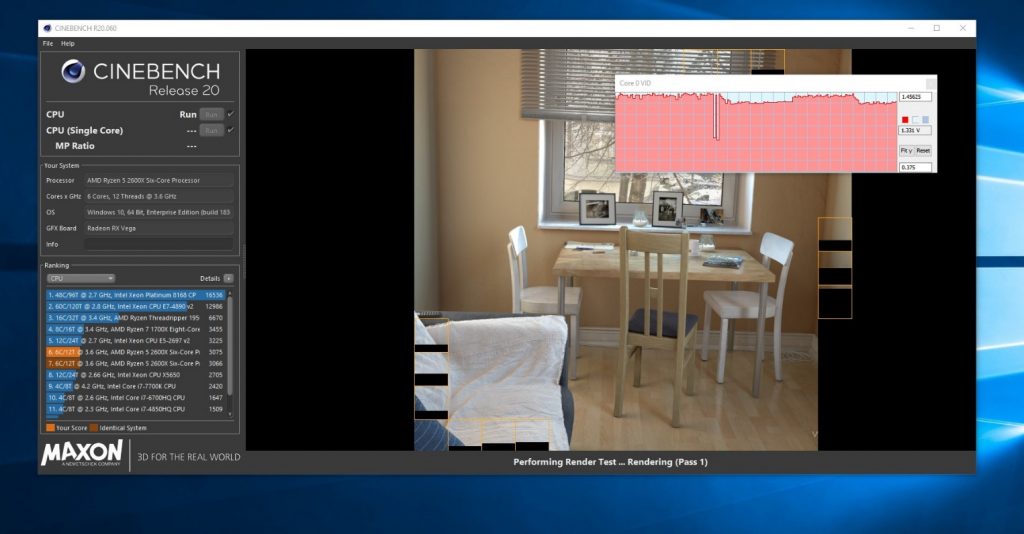
Кривая уровня напряжения имеет провалы. Это именно те моменты, когда процессор был загружен на 100%. Далее посмотрим на результаты для оптимального режима Level 3:
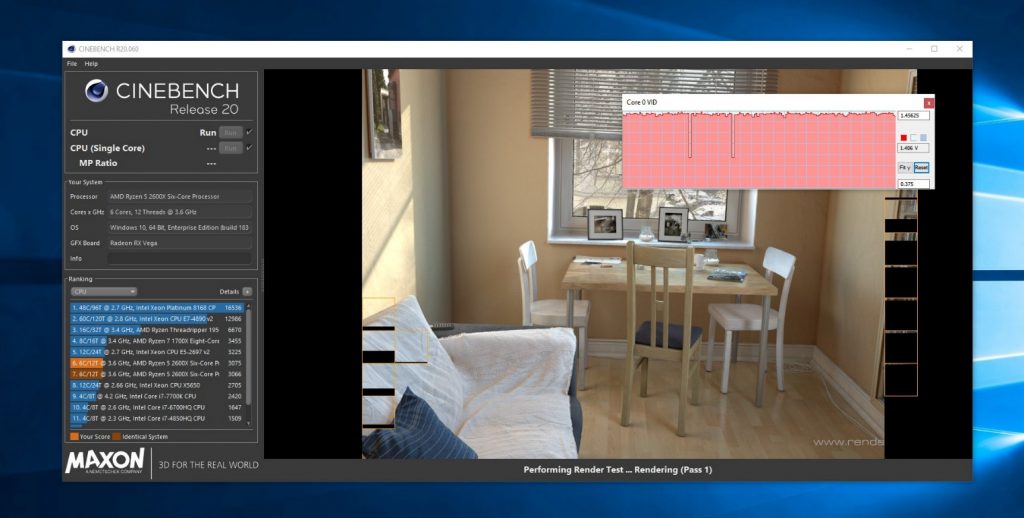
Нагрузка та же, но провалы на кривой уровня напряжения исчезли, оно стабильно держится на заданном уровне.
Ответ на вопрос о том, какой именно уровень CPU Load-Line Calibration установить, зависит от того, как сильно падает напряжение, подаваемое на процессор при нагрузке. Начинать стоит с самых малых значений, увеличивая уровень использования режима LLC постепенно до тех пор, пока падение напряжения остаётся. Вы поймёте, что подобрали нужный уровень, как только напряжение, подаваемое на процессор под нагрузкой, стабилизируется на установленном вами значении. Большинству пользователей подойдут режимы Level 3 (50%) и Level 4 (75%).
Самое высокое значение — Level 5 (100%) — может быть полезно только для выполнения экстремального разгона процессора. Выбор этой опции приведёт к значительному повышению температур и напряжения, подаваемого на процессор в простое, что повлечёт за собой быструю деградацию кристалла процессора.
Выводы
Теперь вы знаете какой уровень Load-Line Calibration ставить, в зависимости от ваших целей и задач. Load-Line Calibration — очень полезная технология, позволяющая стабилизировать работу компьютера с разогнанным процессором. Включив её и подобрав оптимальное для вас значение, вы больше не столкнётесь с проблемой возможной нестабильной и неровной работы процессора. Однако и переусердствовать было бы нежелательно: завышенное напряжение, подаваемое на процессор, не всегда сказывается положительно — оно влечёт за собой повышенные энергопотребление и тепловыделение. В неумелых руках технология LLC Ryzen может только усугубить проблемы и даже привести к порче оборудования.
Msi Cpu Lite Load (Deep Research)
Here in TechReviewTeam we actively fight the spread of false and misinformation on the Internet as it is detrimental to all the readers, especially when we’re talking about sensitive topics. All of our content is edited by a professional and fact checked by an external fact-checking service.
Fact-checking is a procedure that verifies information in order to ensure the accuracy and authenticity of reporting. Fact-checking can be undertaken before or after the publication. Internal fact-checking is performed in-house by the publisher; external fact-checking is performed by a third party.
✅ Fact Checked
Updated on January 30, 2023
Written by
John Chad, Bachelor Degree in Computer Science & Computer Engineering.
Fact Checked by
Russel Collins
John is a certified IT & Computer Engineer with a Bachelors Degree. He has worked for a International Insurance Company in the IT department before deciding to become a full time blogger to help his readers. Holds a Bachelors Degree in Computer Science from Stanford University.
⭐ Fun Fact ⭐
The first commercially available CPU, the Intel 4004, was released in 1971 and had a clock speed of just 740 kHz. Despite its limited processing power, it was a revolutionary device that paved the way for modern computing as we know it today.
Computers are an integral part of our daily lives, and the central processing unit (CPU) is the heart of any computer system. The CPU is responsible for executing instructions and performing operations. As technology advances, so does the demand for more powerful and efficient CPUs. The MSI CPU Lite Load is a feature that has been introduced in recent MSI motherboards, aimed at making the CPU operate more efficiently and effectively. This feature is especially useful for users who are looking to build a powerful computer system with a focus on energy efficiency. This article will delve into the MSI CPU Lite Load and explore its benefits and applications.
Table of Contents
1 Overview of MSI CPU Lite Load Technology
A. Definition of CPU Lite Load
MSI CPU Lite Load technology refers to a set of features designed to reduce the CPU load and improve system stability in high-performance computing systems. This technology is exclusively available on MSI motherboards and provides users with a powerful, efficient, and reliable system that can handle demanding applications and workloads.
B. Benefits of MSI CPU Lite Load Technology
The benefits of MSI CPU Lite Load technology are numerous and include improved system stability, reduced CPU load, and increased performance. This technology helps to reduce the amount of processing power required to run demanding applications and workloads, freeing up resources for other tasks. This results in a more responsive and efficient system that can handle multiple tasks with ease. Additionally, the reduced CPU load can also help to extend the lifespan of your system, as it reduces the amount of stress placed on the CPU.
C. How MSI CPU Lite Load Technology Works
MSI CPU Lite Load technology works by optimizing the system’s power management settings to reduce the amount of processing power required to run demanding applications and workloads. This is achieved through a combination of software and hardware optimizations, including the use of advanced power management algorithms and the implementation of low-power modes. These optimizations help to reduce the amount of power required by the CPU, thereby reducing the CPU load and improving system stability.
See also Multiple Vr Headsets One Pc (Fact Checked)
So essentially, MSI CPU Lite Load technology is a powerful and innovative solution for high-performance computing systems, providing users with a stable, efficient, and reliable system that can handle demanding applications and workloads with ease. Whether you’re a gamer, a content creator, or just someone who needs a powerful and reliable system, MSI CPU Lite Load technology is the perfect solution for you.
2 Advantages of MSI CPU Lite Load Technology
Advantages of MSI CPU Lite Load Technology:
A. Improved System Stability: MSI CPU Lite Load Technology ensures that the system is more stable and reliable by reducing the load on the CPU. This results in less heat generation and lower power consumption, leading to a more stable system. With this technology, you can be sure that your system will run smoothly and efficiently, even under heavy load.
B. Reduced Power Consumption: The reduced load on the CPU also means that the system consumes less power, making it more energy efficient. This means that you can save money on your energy bills and reduce your carbon footprint. Additionally, the reduced power consumption also results in a longer lifespan for your system components, as they are subjected to less stress and wear and tear.
C. Enhanced Performance: The reduced load on the CPU also results in enhanced performance, as the CPU is able to focus on the most important tasks. This results in faster and more efficient processing, leading to improved performance and a better overall user experience. Additionally, the improved stability and reduced power consumption also contribute to a more enjoyable and productive computing experience.
So basically, MSI CPU Lite Load Technology offers a range of advantages that can improve the stability, efficiency, and performance of your system. With this technology, you can be sure that your system will run smoothly and efficiently, even under heavy load, while also reducing your energy consumption and carbon footprint.
3 MSI CPU Lite Load Technology in Action
A. Real-Life Applications of MSI CPU Lite Load Technology
MSI CPU Lite Load Technology is a powerful tool that has been designed to enhance the performance and stability of computer systems. This technology is particularly useful in real-life applications where system stability and performance are critical, such as gaming, content creation, and scientific simulations.
In gaming, for example, MSI CPU Lite Load Technology can help to eliminate lag and stuttering, ensuring that players have a seamless and enjoyable gaming experience. In content creation, it can help to reduce the time it takes to render complex scenes, and in scientific simulations, it can help to ensure that results are accurate and consistent.
B. Comparison with Traditional CPU Load Management
MSI CPU Lite Load Technology is a step up from traditional CPU load management methods. Unlike traditional methods, which simply reduce the frequency of the CPU to manage load, MSI CPU Lite Load Technology uses a more sophisticated approach that takes into account the specific needs of the system.
See also Can Oculus Be Played Outside? (Expert Answers)
This technology can dynamically adjust the frequency of the CPU based on the current load, ensuring that the system is always running at optimal performance. This results in improved system stability and reduced power consumption, compared to traditional methods.
C. Case Studies of MSI CPU Lite Load Technology
There have been several case studies that have demonstrated the effectiveness of MSI CPU Lite Load Technology. One such study involved a gaming PC that was equipped with MSI CPU Lite Load Technology. The results showed that the system was able to maintain a stable and consistent frame rate, even when the CPU was under heavy load.
Another study involved a content creation workstation that was equipped with MSI CPU Lite Load Technology. The results showed that the system was able to reduce the time it took to render complex scenes by up to 50%, compared to a similar system that did not have this technology.
These case studies clearly demonstrate the benefits of MSI CPU Lite Load Technology, and show that it is a powerful tool for improving the performance and stability of computer systems. Whether you are a gamer, content creator, or scientist, MSI CPU Lite Load Technology is an investment that is sure to pay off in terms of improved system performance and stability.
4 Choosing the Right MSI Motherboard for Your System
A. Compatibility with MSI CPU Lite Load Technology
When choosing a MSI motherboard, it is important to ensure that it is compatible with MSI’s CPU Lite Load technology. This technology is designed to enhance the performance and stability of your system, so it’s important that your motherboard supports it. To check compatibility, look for motherboards that are equipped with the latest Intel chipsets and support the latest Intel processors. Additionally, make sure the motherboard has a BIOS that is compatible with MSI’s CPU Lite Load technology.
B. Factors to Consider When Selecting a MSI Motherboard
In addition to compatibility with MSI’s CPU Lite Load technology, there are several other factors to consider when selecting a MSI motherboard. These include the number of RAM slots, the number and type of expansion slots, the number of SATA ports, and the type of USB ports. Additionally, you should consider the form factor of the motherboard, as well as the overall design and features. Some motherboards also come with built-in Wi-Fi, Bluetooth, and other features that may be important to you.
C. Recommendations for Best MSI Motherboards with CPU Lite Load Technology
If you’re looking for the best MSI motherboards with CPU Lite Load technology, there are several options to choose from. The MSI Z590-A Pro is a great option for those who want a budget-friendly motherboard with support for the latest Intel processors. The MSI MPG Z590 Gaming Edge WiFi is a great choice for gamers, as it features a robust power delivery system and support for high-speed memory. Finally, the MSI MEG Z590 Ace is an excellent choice for enthusiasts who want a high-end motherboard with the latest features and technologies.
So ultimately, when choosing a MSI motherboard, it’s important to consider compatibility with MSI’s CPU Lite Load technology, as well as other important factors such as the number of RAM slots, expansion slots, SATA ports, and USB ports. Additionally, you should consider the form factor of the motherboard, as well as the overall design and features. With these considerations in mind, you can choose the best MSI motherboard for your system and enjoy the enhanced performance and stability that MSI’s CPU Lite Load technology provides.
See also Can Ram Speed Bottleneck Cpu? (Fact Checked)
5 FAQ
What is CPU Lite load control?
CPU Lite Load Control is a power management technique used to reduce the power consumption of a CPU. This is achieved by dynamically adjusting the CPU’s operating voltage and frequency based on the current load, allowing the CPU to use less power when it is under lighter loads and ramp up when more processing power is needed. This results in reduced power consumption, which can lead to longer battery life in mobile devices and lower energy costs in data centers.
How to overclock MSI BIOS?
Yes, you can overclock MSI BIOS. Here’s how:
1. Enter the BIOS by restarting your computer and pressing the “Delete” key repeatedly until the BIOS screen appears.
2. Navigate to the “Advanced” tab and select “OC” (overclocking) or “Overclock” settings.
3. Adjust the frequency and voltage of your CPU and memory to increase their performance.
4. Save your changes and exit the BIOS.
5. Test the stability of your overclock by running benchmarking software or stress tests.
6. If the overclock is unstable, adjust the frequency and voltage settings in the BIOS until stability is achieved.
Note: Overclocking can void your warranty and potentially damage your components, so proceed with caution. Make sure to monitor your temperatures and keep them within safe limits.
What is the stock voltage of 13600k?
The stock voltage of the Intel Core i5-13600K varies based on the motherboard and BIOS settings. Typically, it operates at a voltage range of 0.55V to 1.3V.
Note: The exact voltage can be found in the motherboard’s BIOS settings or by using CPU monitoring software. It’s important to keep in mind that changing the voltage can impact the stability and longevity of the processor, so it’s best to consult the manufacturer’s specifications before making any adjustments.
6 Conclusion
To conclude, MSI CPU Lite Load Technology is a game-changer in the world of computing. The technology provides a host of key benefits including improved system stability, reduced power consumption, and enhanced performance. These benefits have been demonstrated through real-life applications and case studies, making it clear that MSI CPU Lite Load Technology is a top choice for anyone looking to optimize their computer system.
Final Thoughts on MSI CPU Lite Load Technology: As technology continues to evolve, it’s exciting to think about the future of MSI CPU Lite Load Technology. It’s clear that the technology will only continue to improve and offer even more benefits to users in the years to come.
Future of MSI CPU Lite Load Technology: With the increasing demand for energy-efficient and high-performance computing systems, MSI CPU Lite Load Technology is poised to play a major role in shaping the future of computing. Its ability to provide both improved performance and reduced power consumption makes it a technology worth investing in for anyone looking to upgrade their computer system.
In short, MSI CPU Lite Load Technology is the solution for anyone looking to optimize their computer system for maximum performance and efficiency. So, if you’re in the market for a new motherboard, consider choosing one that’s compatible with MSI CPU Lite Load Technology. You won’t regret it!
Post Views: 2,315

Hello Gamer! Welcome to TechReviewTeam!
Everything you need to know about the latest Technology news and tutorials, we got your back!
As an Amazon Associate, I earn from qualifying purchases.
Помогите пожалуйста
Добрый день, у меня 7-11700к, в биусе msi z490 tomahawk есть раздел cpu lite load есть смысл переберать моде от мод 6 до мод 10?
Авх инструкции стоит выключит все
Бывает такой момент неронятный что в тестах аиды либо в играх
Может жор брать 190 а может и 210 причем рандомно.
В игре тупо стоишь может и меньше а может и больше брать
Кулер стоит депкул 400ех но вместо родных вентиляторов заменил на пару биквай pure wings 2-(120размер до 2000 оборотов)
Комментарии 15

Intel_Expert
2 года назад
Добрый день! Первое, что стоит сделать, так это сбросить настройки в UEFI(BIOS). Отключение AVX инструкций негативно скажется на производительности. В AIDA64 можно получить и более высокое потребление. Рекомендую ориентироваться на реальные задачи.
С какой проблемой вы столкнулись? Зачем устанавливаете LLC и отключаете AVX-инструкции?
Так же укажите, пожалуйста, полную конфигурацию системы.
Развернуть ответы 14
Обсуждение товара
Сборка компьютера, апгрейд 11 месяцев назад
Ryzen 5800x работает на 4 ядрах 8 потоков
Купил я значит неделю назад проц 5800x, и вот решил зайти в cpu-z посмотреть в каком канале оператива работает и обратил внимание что у меня отображается всего 4 ядра и 8 потоков. Сначала подумал может cpuz глюканул и решил проверить в аиде, все тоже самое. Ну и в диспетчере задач тоже. Кто что может сказать по этому поводу, потому что я в АМД процессорах практически не шарю , до этого пользовался intel и АМД ниразу не пользовался. Может быть в биосе какие настройки выставить или это брак?
Видеокарты 1 год назад
Подходят ли все комплектующие? Все ниже.
Подходят ли все комплектующие? Мат.плата- ASUS TUF B450M-PRO GAMINGПроцессор- amd ryzen 5 5600gОпер.память- Crucial 16ГБ 3200МГц (потом дополню до 32)Корпус- AeroCool Bionic v2Кулер для процессора- DEEPCOOL GAMMAXX 400 V2 Жесткий диск- 1 ТБ Seagate BarraCuda(7200об/мин 64мб)Блок питания- Thermaltake Smart RGB 500W
Настольные игры 1 год назад
Совместимость вентиляторов в корпусе
хочу купить корпус «ZET GAMING Rare Minicase MS3 WG белый» , без вертушек. Докупить к нему 6 вентиляторов (три фронтовых , один тыловой , и два сверху) , остановился на «ID-COOLING RGB Series [NO-12015-XT ARGB SNOW]» , так же будет контроллер всего этого «ID-cooling HA-02» .
Процессоры 1 год назад
Хочу собрать ПК на карточке 3050!
Хочу собрать ПК на карточке 3050! но вот думаю может сначала собрать пк на 7 5700g или 7 5750g с памятю 3200 или 3600 на 16 или 32 по две планки в любом случае. в принципе этой мощности мне хватит на какоето время . а через месяц — 3 купить 3050 или чуть сильнее видюху . подскажыте как лучше . и если кто розберается подскажыте какое водяное охлаждение лучше взять до 10000 р .
Видеокарты 8 месяцев назад
мало фпс в играх
доброго времени суток, собрал в 2020 году пк, комплектующие:Оперативная память Goodram Iridium 8 ГБ, Процессор AMD Ryzen 5 2400G OEM, Видеокарта Sapphire Radeon RX 570 PULSE OC 8gb, Материнская плата ASRock Fatal1ty X370 Gaming X играть часто начал с.