Как заменить Bing на Google в Windows 10?
Потому в Windows 10, как уже известно, к поисковику Bing, который там используется по умолчанию, «привязано» много чего. По примеру своих основных конкурентов — Apple и Google — новую операционку Microsoft фактически подарила (куда ж деваться?) тем своим юзерам, которые раньше пользовались версиями Windows 7 и Windows 8.1.
А поскольку «конь дареный», то комплектовал его разработчик, руководствуясь прежде всего собственными бизнес-интересами и «раскручивая» собственные сервисы.
Потому в Windows 10 Bing везде: через Bing работает новый поиск, которая появился в Панели задач, через Bing обрабатываются команды для Cortana и пр.
В общем, убрать Bing из Windows 10 полностью никак не получится (у обычного юзера, так точно), однако в Microsoft Edge — штатном браузере Windows 10 — поисковую систему заменить все же можно, при необходимости, конечно.
Итак, чтобы в Windows 10 заменить Bing на Google (или другой поисковик), делаем следующее:
- жмем кнопку Windows на клавиатуре (или кнопку Windows на панели задач, или кнопку Windows на экране) и запускаем приложение Microsoft Edge (это если оно не «висит» отдельной плиткой на Стартовом экране), либо кликаем «Все приложения» и находим Edge в списке установленных программ;
- запустив Microsoft Edge, жмем иконку с тремя точками, расположенную в правом верхнем углу экрана и заходим в «Настройки«;
- прокручиваем меню настроек вниз и заходим в «Дополнительные параметры» (кнопка «Посмотреть дополнительные параметры»);
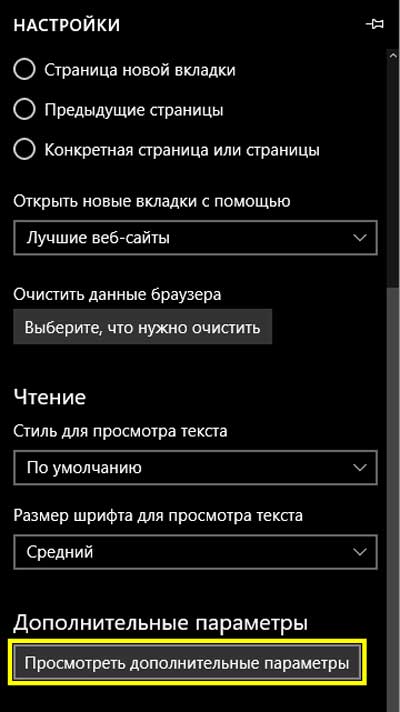
- в «Доп. параметрах» снова крутим меню вниз до вкладки «Поиск в адресной строке с помощью«, кликаем по надписи «Bing («www.bing.com»)«, выбираем нужный вариант Googleв списке (или набираем в строке « «) и подтверждаем выбор нажатием на кнопку «Использовать по умолчанию«.
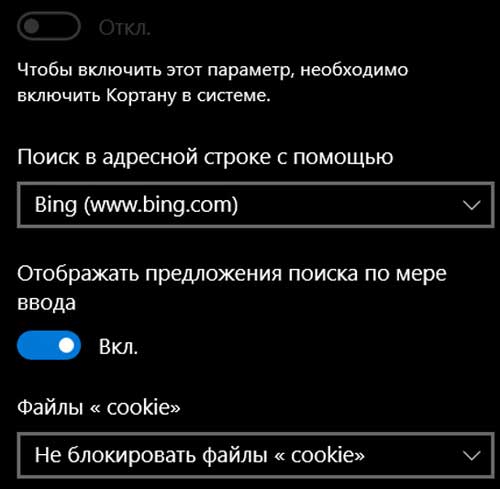
Теперь Edge в вашей Windows 10 искать все будет через Google, а не через Bing, как раньше. Таким же образом, в Edge можно прописать и другой поисковик, но только из тех, которые Edge поддерживают.
Однако этим допускаемая Microsoft самодеятельность юзеров в плане замены поисковиков и заканчивается. Cortana и поиск в Windows 10 (а не в Edge), к примеру, в любом случае работают только через Bing, и тут, что называется, без вариантов.
Правда, если Bing в самой Windows 10 вам вдруг нравиться перестанет, можно вообще убрать поисковую строку (кликаем по ней ПКМ или тапаем и удерживаем нажатие до появления меню, в которой надо нажать «Скрыть»). Но способов отключить Cortana от Bing еще не придумали… Пока.
Установка Bing в качестве поисковой системы по умолчанию
В этой статье описывается, как можно сделать Bing поисковой системой по умолчанию для браузеров Microsoft Edge, Google Chrome и Internet Explorer.
Microsoft Edge в Windows 10 версии 1703 или более поздней
Хотя вы настраиваете Bing в качестве поисковой системы по умолчанию, Microsoft Edge позволяет пользователям изменять свои параметры для использования другой поисковой системы.
Если параметр, описанный в этом разделе, не найден внутри GPMC, скачайте соответствующий ADMX-файл и скопируйте их в центральное хранилище. Дополнительные сведения см. в статье Изменение Domain-Based объектов групповой политики с помощью файлов ADMX. Центральное хранилище на контроллере — это папка со следующим соглашением об именовании: %systemroot%\sysvol\\policies\PolicyDefinitions
Каждый домен, обрабатываемый контроллером, должен получить отдельную папку. Для копирования ADMX-файла из командной строки можно использовать следующую команду:
- Откройте консоль управления групповыми политиками (gpmc.msc) и перейдите к редактированию любой существующей политики или созданию новой.
- Перейдите к разделу \Administrative Templates\Windows Components\Microsoft Edge.
- Дважды щелкните параметр Set default search engine (Задать поисковую систему по умолчанию), установите значение Enabled (Включено) и введите https://www.bing.com/sa/osd/bfb.xml
- Примените полученный объект групповой политики, привязав его к нужному домену.
Google Chrome в Windows 10 версии 1507 или более поздней
Пользователи не смогут сменить поисковую систему по умолчанию после установки этой политики.
Chrome поставляется с собственным набором параметров групповой политики, которые можно скачать в виде ADMX-файла из справки Google Chrome для бизнеса.
Скопируйте файл шаблона в центральное хранилище для файлов ADMX на контроллере домена. Дополнительные сведения см. в статье Изменение Domain-Based объектов групповой политики с помощью файлов ADMX. Центральное хранилище на контроллере — это папка со следующим соглашением об именовании: %systemroot%\sysvol\\policies\PolicyDefinitions
Каждый домен, обрабатываемый контроллером, должен получить отдельную папку. Для копирования ADMX-файла из командной строки можно использовать следующую команду:
- Откройте консоль управления групповыми политиками (gpmc.msc) и перейдите к редактированию любой существующей политики или созданию новой.
- Проверьте, что в разделе Administrative Templates (Административные шаблоны) для обеих конфигураций User/Computer Configuration (Конфигурация пользователя/компьютера) отображаются следующие папки: Google Chrome и Google Chrome – Default Settings.
- Параметры первого раздела являются фиксированными, и локальные администраторы не смогут их изменять в браузере.
- Параметры последнего раздела политик могут изменяться пользователями в настройках браузера.
- Перейдите к разделу Configuration\Administrative Templates\Google Chrome\Default search provider
- Дважды щелкните параметр Enable the default search provider (Включить поставщика поиска по умолчанию) и установите для него значение Enabled (Включено).
- Дважды щелкните параметр Default search provider icon (Значок поставщика поиска по умолчанию), установите для него значение Enabled (Включено) и введите https://www.bing.com/sa/simg/bb.ico
- Дважды щелкните параметр Default search provider instant URL (URL-адрес для быстрого поиска поставщика поиска по умолчанию) и введите https://www.bing.com/business/search?q=&form=BFBSPR
- Дважды щелкните параметр Default search provider name (Имя поставщика поиска по умолчанию), установите для него значение Enabled (Включено) и введите «Поиск (Майкрософт) в Bing»
- Дважды щелкните параметр Default search provider search URL (Поисковый URL-адрес поставщика поиска по умолчанию), установите для него значение Enabled (Включено) и введите https://www.bing.com/business/search?q=&form=BFBSPR
- Примените полученный объект групповой политики, привязав его к нужному домену.
Internet Explorer 11 или более поздняя версия
Пользователи смогут сменить поставщика поиска после установки этой политики.
ШАГ 1. Настройка локального компьютера, который будет использоваться для задания объекта групповой политики
Вставьте следующий текст в файл reg(*.reg).
Windows Registry Editor Version 5.00
[HKEY_CURRENT_USER\Software\Microsoft\Internet Explorer\SearchScopes] "DefaultScope"="" [HKEY_CURRENT_USER\Software\Microsoft\Internet Explorer\SearchScopes\] "Codepage"=dword:0000fde9 "DisplayName"="Microsoft Search in Bing" "OSDFileURL"="https://www.bing.com/sa/osd/bfb.xml" "FaviconURL"="https://www.bing.com/sa/simg/bb.ico" "URL"="https://www.bing.com/business/search?q=&form=BFBSPR"
Дважды щелкните созданный файл и выполните действия, чтобы импортировать файл. При успешном импорте должно появиться следующее диалоговое окно:

ШАГ 2. Открытие консоли управления групповыми политиками (gpmc.msc) и переход к редактированию любой существующей политики или созданию новой
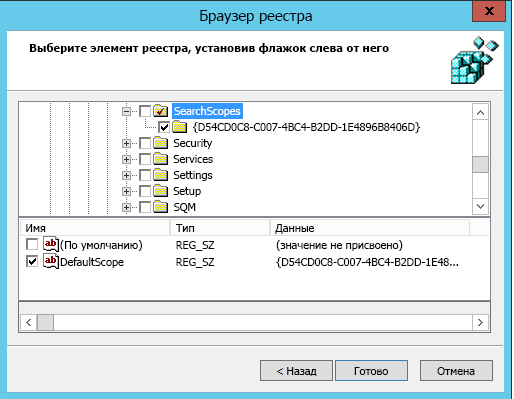
- Перейдите к разделу User Configuration\Policies\Preferences\Windows Settings.
- Щелкните правой кнопкой мыши Registry\New (Реестр\Создать) и выберите Registry Wizard (Мастер реестра). В окне браузера реестра выберите Local Computer (Локальный компьютер) и нажмите кнопку Next (Далее).
- Перейдите к разделу HKEY_CURRENT_USER\SOFTWARE\Microsoft\Internet Explorer\SearchScopes.
- В этом разделе обязательно выберите имя DefaultScope.
- Проверьте все вложенные ключи, содержащие GUID для поиска (Майкрософт) в Bing, и все значения под ключом, кроме любого пути к профилям пользователей. Прокрутите вниз, чтобы выбрать другие элементы.
- Нажмите кнопку «Готово», чтобы завершить настройку.
ШАГ 3. Настройка параметров пользователя для устранения предупреждения, которое может появляться при применении поиска DefaultScope
Это предупреждение является стандартным и уведомляет пользователей о программе, пытающейся изменить настройки.
- В том же объекте групповой политики щелкните правой кнопкой мыши Registry\New (Реестр\Создать) и выберите Registry Wizard (Мастер реестра).
- Перейдите к разделу HKEY_CURRENT_USER\SOFTWARE\Microsoft\Internet Explorer\User Preferences.
- Выберите раздел User Preference (Параметры пользователя).
- Нажмите кнопку Готово.
- Щелкните только что созданный объект. В правой области дважды щелкните объект Пользовательские настройки, измените действие на Удалить и Сохранить.
- Примените полученный объект групповой политики, привязав его к нужному домену.
10 Reason Why Bing is Better Than Google
When do we talk about search engines, which name in your mind comes first? There’s a higher chance that you will choose “Google”, in the list of numerous search engines. You are one of the around 66% of users who are using Google to search your queries and promote your website and business online. But Google ain’t the only search engine that people use and the best example of this is Bing. Bing is the best substitute for Google in so many terms and that’s the reason why many experts described why Bing is better than Google. It’s not always better to compare these two best search engines and their advertisement platforms but users want to know which search engine gives more benefits to them. From saving the cost of online advertisement to driving higher traffic, all things matter for a user. Where Google is listed on the top position in many terms, on the other hand, Bing is also listed on top search engine global. The ⅓ population of the United States uses Bing as a primary search engine and in Hong Kong, the numbers are 19%. These data show how Google is dominating other search engines but because of many features, people still love Bing.
Some Common Reasons Why Bing is not Popular
- Inbuilt Browser:A higher percentage of devices have an inbuilt Google application to search queries. In my opinion, it is the biggest advantage that Google is getting with new devices.
On the other hand, the Bing search engine comes on a limited number of devices, and that why it’s not as popular as Google.
- Better Marketing:Today, even a teenager knows where he/she should have to search the query and this all happened because of marketing. In recent years Google has improved its marketing plans which is the reason for its growth.
Bing is not in the marketing industry as Google, which is a huge reason why the company is lagging at growth.
- New Devices: Just like Apple, now Google is also launching new useful devices like Alexa, Chromecast, and some others. These devices are connected with Google Search Engine and whenever any user performs a query, it automatically happens to Google.
You may already know that Bing is not very active in making electronic devices. The company has to understand that it is one of the best ways to interact with customers.
- Not Focusing on Users Need:Google always updates its algorithm that helps to understand the user’s query better and provides the exact results. It has more than 10 different algorithms that made for different users’ purposes.
It’s a harsh truth but sadly Bing does not care about users as much as Google does. Bing should focus on more user’s needs and update their algorithms.
- Lack of Knowledge: In most countries, People do not use Bing search engines because they don’t have knowledge about it. How could some use a tool when he/she doesn’t have a clue about it?
5 Reasons That Prove Bing is Better Than Google
Bing is lagging in some terms compared to Google but that does not mean it’s not useful at all. This search engine has also many special features and provides so many benefits too that made it even better than Google. Also, it consists of some more uncommon features too that make it more beneficial for the users. Let’s find out how Bing is superior to Google search engine:
Less Competition of Targeted Keyword
In the way of improving business, PPC is one of the most effective strategies for business owners. To target the desired customer, a businessman targets the keywords in PPC. While bidding, the users have to have a certain amount as per popularity and competition. The highest bidder of keywords shows its website ad on the top position which is very beneficial for their website.
The top position website gets the highest traffic, which improves the sale and revenue of the company. That’s the reason a businessman has to spend a lot of money on online advertisements to get traffic, sale, and revenue.
Chance To Drive More Traffic
To drive traffic to a website, there are two methods used by people who are organic and paid. Here’s we only talk about the paid way that helps to get more traffic to your website. Google and Bing both search Engines provide the feature to drive traffic to your website.
Where Google has a higher competition of targeted keywords and niche related customers, it’s difficult to get more customers. You have to compete with thousands or millions of other competitors to get organic reach to your website.
Bing has lower targeted users which cause more traffic to the website. You have to compete with fewer competitors, unlike Google which is a huge benefit for the users. You can easily make a strategy to target those users and bring them to your website or business with less effort. This is also one of the reasons why Bing is better than Google.
Cost-Effective
To compete with a big number of users, you must have good costing for your online advertisement. Cost matters a lot when it comes to advertising for any other website’s growth. But not everyone can afford a higher-paid online advertisement for their business growth which you should keep in mind.
Just because of higher competition, you need a high amount to advertise on the Google search engine. To bid on a keyword you obviously need a good amount otherwise someone else will steal the top position from you. Because of this, you can run an ad for a shorter period in less amount.
In comparison to the Google search engine, it’s very affordable to do online advertisements on the Bing search engine. You need to put a small effort and so do money to successfully get the top position of the ad section on the search engine. Charging a small amount to run an ad makes it cost-effective and affordable. Also, you can run the same ad that you are running on google for a longer time at the same rate as Google.
Don’t Support Broad Negative Keywords
While running PPC Ads on search engines, you have to optimize your ads with keywords. But there are two types of keyword used in PPC, which is Desired Keyword & Negative Keyword. The desired keywords are those, which you are targeting and Negative keywords are totally the opposite of this. Negative Keywords increase the cost of your ads and do not provide exactly niche traffic that is a drawback.
In Google Ads, when you run an ad, the negative keywords automatically get targeted as per user search. The searches can be broad and if you are paying per impression then your ad cost will be definitely increased. There’s an option where you can add a negative keyword, but it is not easy for beginners to handle it.
On the other hand, Bing Ads or Microsoft Advertising does not support broad negative keywords. It’s a default function unlike Google Ads which means even beginners can run their ads easily here. Result in this, you can run your business or website ads for a longer period.
Unique Results And Viewers
You may already know how the search engine works and if you don’t then here’s a super quick guide.
“When a user searches a query on a search engine, the search engine looks at its database and as per search term, it provides the exact result. But it only provides results from that website, which allowed their bot or crawler to read them. To do this a website owner has to fetch their link on the search engine console.”
As per this term, if a website does not allow or block a specific search engine or multiple then the website is definitely not available on that search engine.
Most website owners target only the Google search engine because it has a large number of daily searches. At Google, more than 10 billion query searches perform daily which is a huge number and more than all of the search engines in the world.
Just like Google, Site admins also target the Bing search engine for a special purpose. We earlier discussed that a search engine only showed those websites as a result which allowed their crawler to read them. So if a website blocked Google bot and allowed Bing Bot then you can find that website only at Bing. Getting unique customers or users shows why Bing is better than Google.
Beneficial For Long Term Business
We all know that to run a Business the capital plays an important role which is the base of the business. For a large-scale business, you need a large amount of capital. The reverse of this, A small-scale business demands a low amount of capital. Advertising a business opens the door to get more customers, which directly affects sales and revenue positively.
But what if when you are running a small-scale business but the cost of your business ads is higher. You probably will not run it for a longer period because it will not give you that much ROI (Return of Investment) that you are aiming for. After a time you will stop running ads on the online advertising platform.
Google Ads charges are higher compared to any other search engine advertisement cost, which is perfectly suitable for a small-scale business. If everything does not go well then the company could face a huge loss.
At this matter, Bing is very beneficial for those websites or business owners who are running a low-scale business. A small business owner can easily run its business ads for a longer time (almost thrice or more) in the same amount which is pocket-friendly. This makes Bing better than Google Ads and other search engines too.
Conclusion
In many terms, Bing is better than Google Adwords and search engine. It is cost-effective, easy to use, and brings unique customers which is a huge plus point. There are also some more benefits that bing provides to the users that you can find.
Windows Edge: Замена поиска Bing на Google
В браузере Microsoft Edge поисковой системой по умолчанию стоит Bing, чтобы это изменить, нужно установить новую поисковую систему и назначить ее поисковой системой по умолчанию. Я менять буду на более привычную для меня Google
ADVERTISEMENT
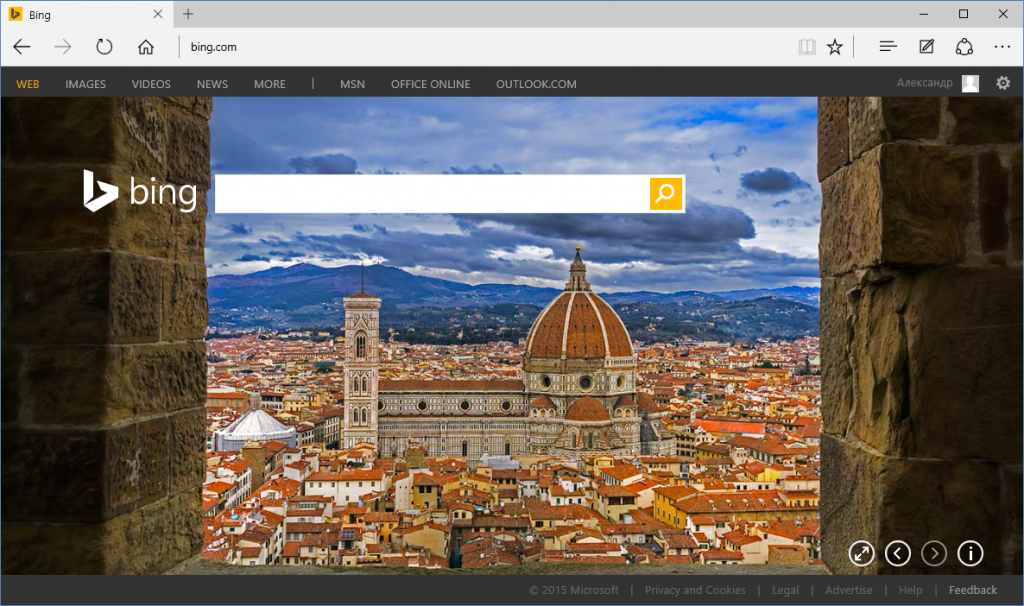
Переходим на сайт Google, для каждой страны свой: Украина — google.com.ua, Россия — google.ru итд.
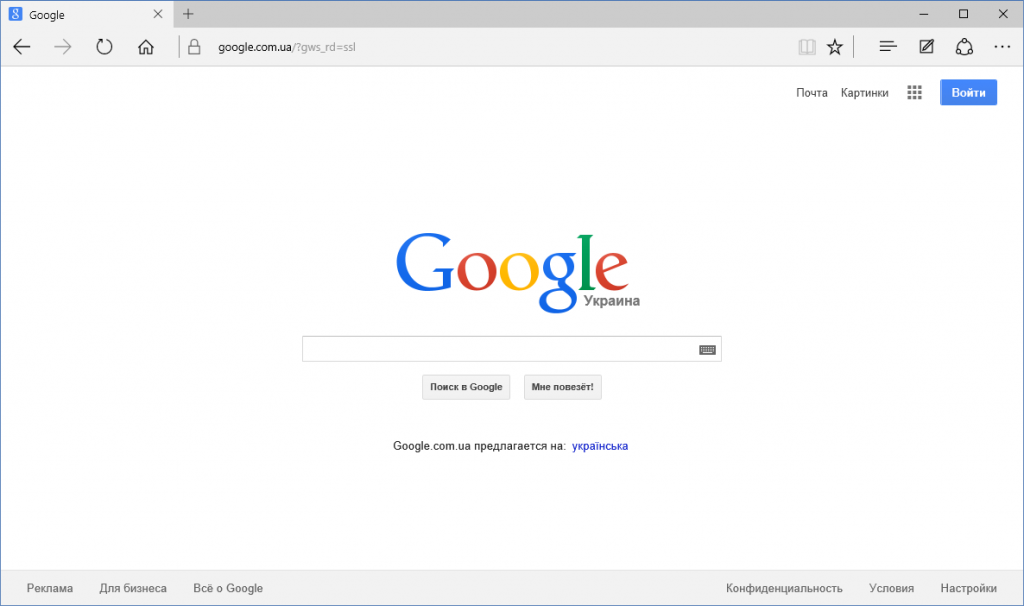
Заходим в Настройки браузера в правом верхнем углу жмём на значок в виде трёх точок
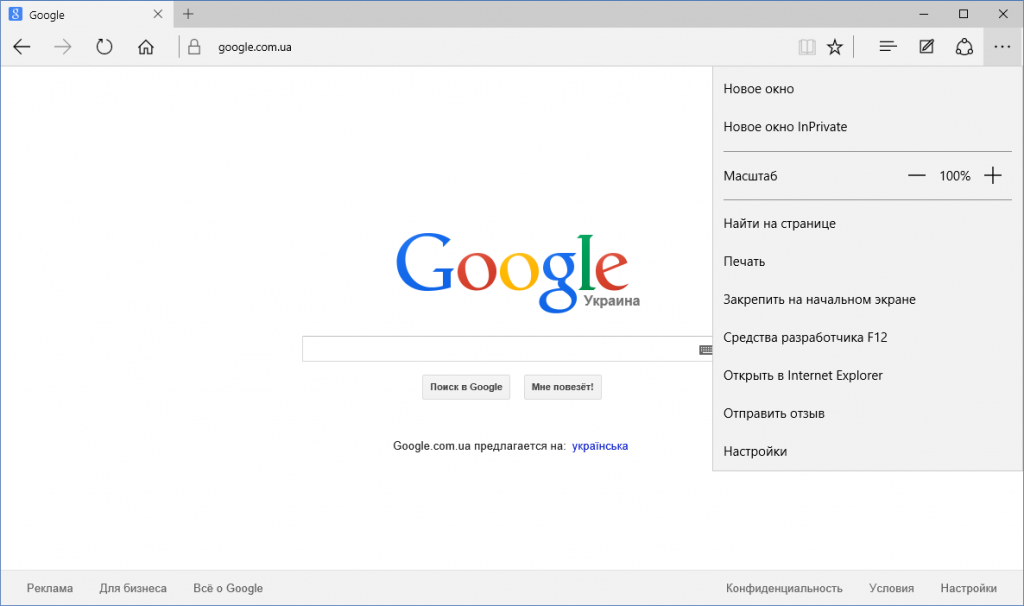
Листаем вниз и выбираем Просмотреть дополнительные параметры
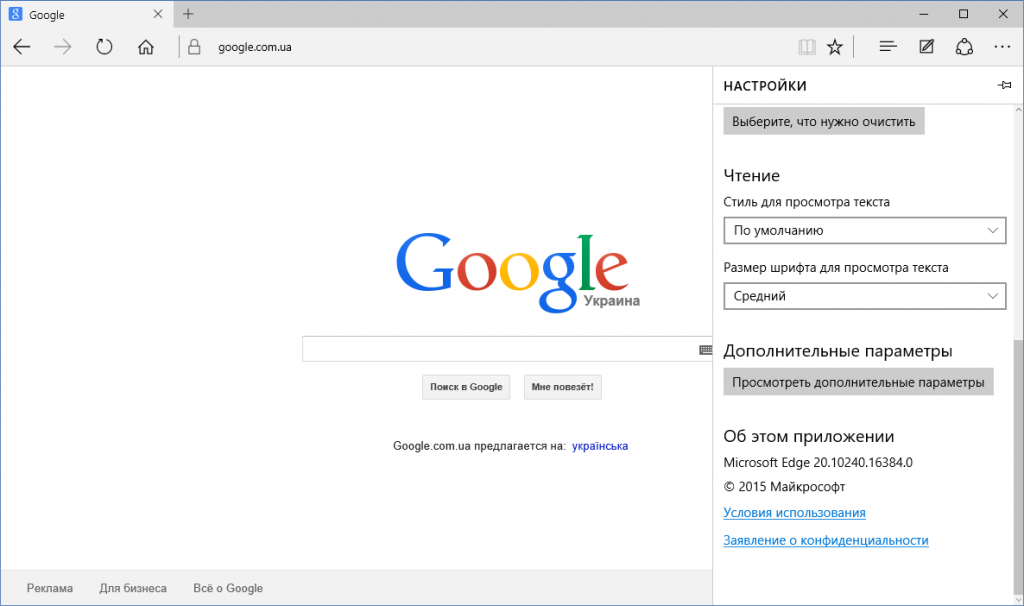
Находим строку Поиск в адресной строке с помощью и выбираем Добавить новый
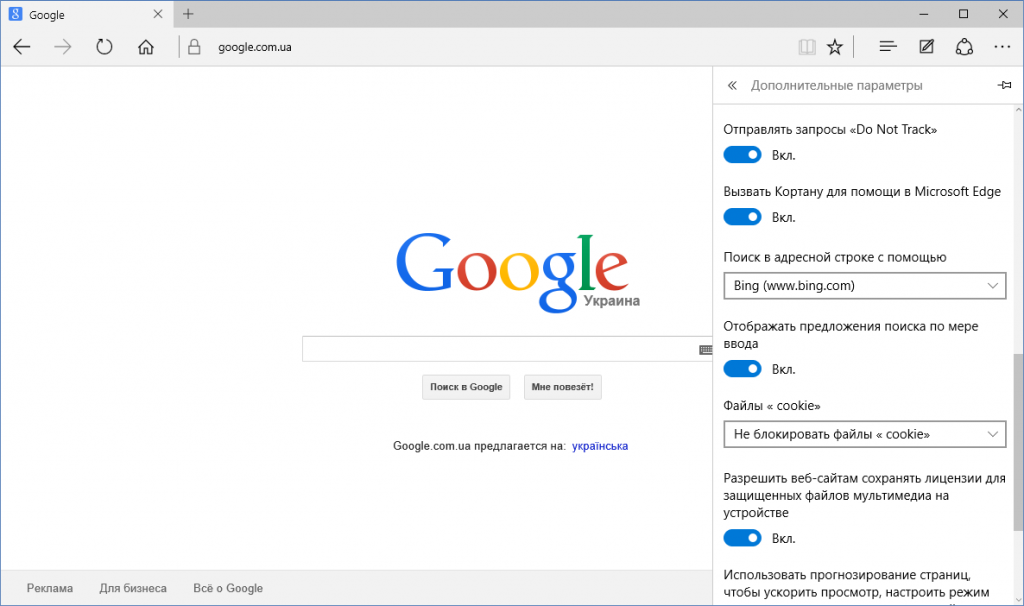
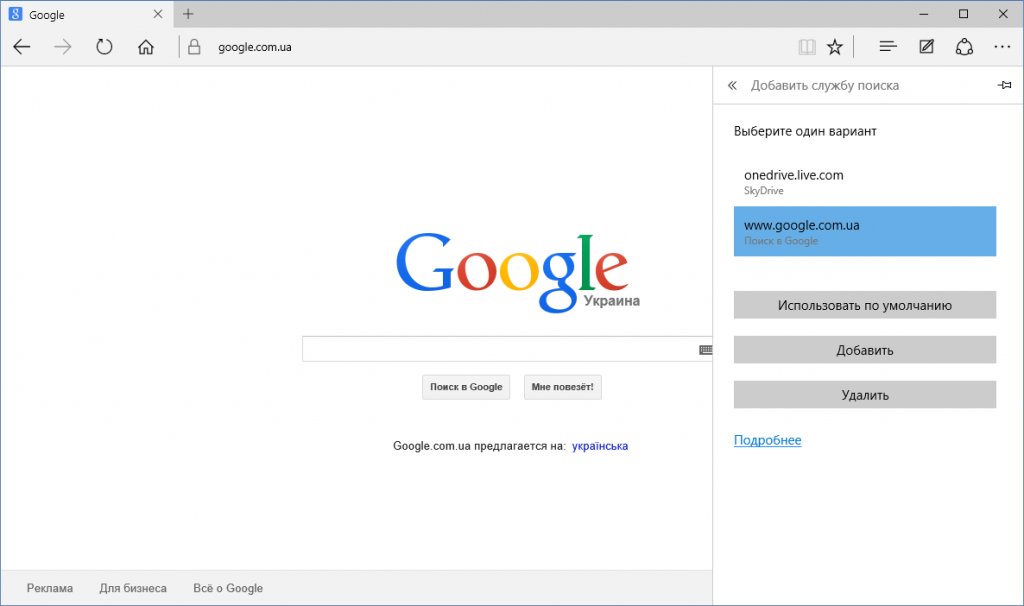
В списке выбираем адрес поисковой системы тот который нужно и жмём Использовать по умолчанию
Перезагружаем браузер и проверяем.
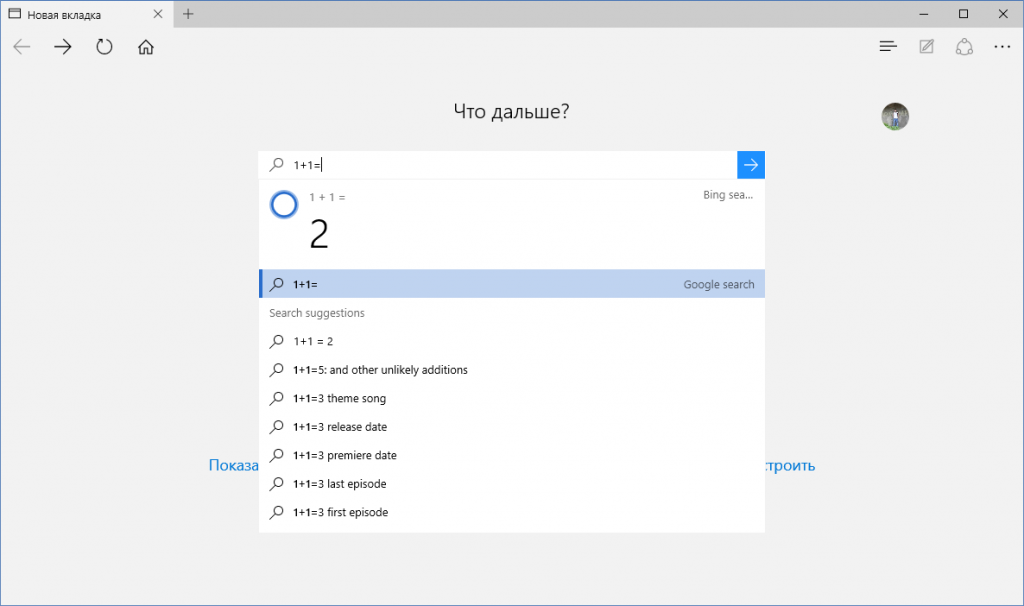
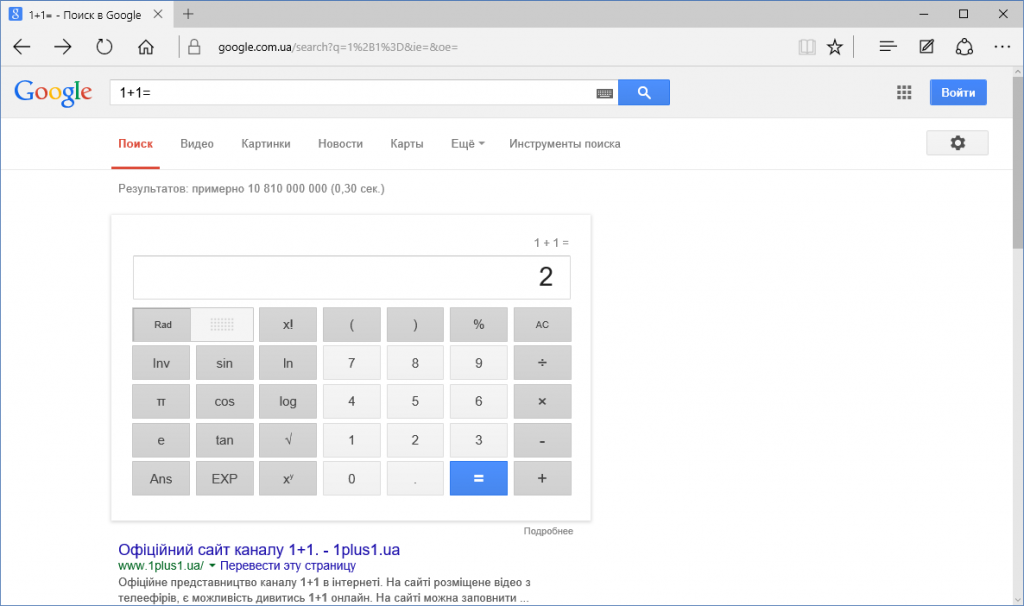
Теперь у нас по умолчанию используется поисковая система от Google.
alexnettm Send an email 28 июля, 2015 EDT at 10:22 пп Last Updated: 28 июля, 2015 EDT at 10:22 пп
4 26 055 Less than a minute
ADVERTISEMENT
Избавляемся от назойливой рекламы в Skype
Windows 10 — пошаговая установка на компьютер
Related Articles

Windows 12: Что нужно для успеха следующей версии Windows?
20 декабря, 2022 EST at 9:48 пп

Windows 11 получила поддержку Android 13 в Windows Subsystem for Android
20 декабря, 2022 EST at 9:31 пп

Windows 11: Как скрыть содержимое раздела «Рекомендуем» в меню «Пуск»
10 мая, 2022 EDT at 6:15 пп

Microsoft предупреждает пользователей: удалите Windows 11 KB5012643, если оно приводит к сбою ваших приложений
6 мая, 2022 EDT at 2:27 пп

Windows 11: Как создать загрузочный USB-накопитель 3 способа
5 мая, 2022 EDT at 9:51 пп

Как установить Java JDK (Java Development Kit) в Windows 11
22 января, 2022 EST at 4:40 пп
Подписаться
4 Comments
Старые Популярные
Межтекстовые Отзывы
Посмотреть все комментарии
Загрузить ещё комментарии
Интересное в сети
27 апреля, 2023 EDT at 3:11 пп

20 декабря, 2022 EST at 9:48 пп

20 декабря, 2022 EST at 9:31 пп

15 июля, 2022 EDT at 7:47 пп

15 июля, 2022 EDT at 7:32 пп
Случайный пост
25 марта, 2012 EDT at 1:16 дп
Midnight Commander — файловый менеджер.
4 июля, 2022 EDT at 8:06 дп
Rufus 3.19: как легко обойти ограничения установки Windows 11
11 июля, 2018 EDT at 4:59 пп
Remove WordPress emoji code in your pages head without plugin
Комментарии
alexnettm Добрый день. Что значит DFS-канал? DFS — на диапазоне Wi-Fi.
Alexander Здравствуйте, спасибо большое за статью достаточно понятно в.
Виолетта Считаю раздельный вид ключевой функцией скайп в режиме много.
Амрулло Спасибо большое за статью. Не подскажите пожалуйста какие оп.
Олег https://drive.google.com/file/d/1zeFtLBH-O1Y-z5QKI3S8C6FkXY1.
ПОПУЛЯРНЫЕ СТАТЬИ

16 февраля, 2015 EST at 11:37 дп

16 июля, 2017 EDT at 12:49 дп

20 апреля, 2015 EDT at 11:38 пп
САМЫЕ КОММЕНТИРУЕМЫЕ
20 апреля, 2015 EDT at 11:38 пп
6 июня, 2021 EDT at 12:44 дп
16 июля, 2017 EDT at 12:49 дп
© Copyright 2023, All Rights Reserved | ALEXNETTM.COM
Manage Consent
To provide the best experiences, we use technologies like cookies to store and/or access device information. Consenting to these technologies will allow us to process data such as browsing behavior or unique IDs on this site. Not consenting or withdrawing consent, may adversely affect certain features and functions.
Functional Functional Always active
The technical storage or access is strictly necessary for the legitimate purpose of enabling the use of a specific service explicitly requested by the subscriber or user, or for the sole purpose of carrying out the transmission of a communication over an electronic communications network.
Preferences Preferences
The technical storage or access is necessary for the legitimate purpose of storing preferences that are not requested by the subscriber or user.
Statistics Statistics
The technical storage or access that is used exclusively for statistical purposes. The technical storage or access that is used exclusively for anonymous statistical purposes. Without a subpoena, voluntary compliance on the part of your Internet Service Provider, or additional records from a third party, information stored or retrieved for this purpose alone cannot usually be used to identify you.
Marketing Marketing
The technical storage or access is required to create user profiles to send advertising, or to track the user on a website or across several websites for similar marketing purposes.